Updates and packages
The System page shows available updates and installed packages for the host and new images for
the containers. Quadeck detects the package manager; QUADECK_PACKAGE_MANAGER forces one.
| Manager | Distributions | Updates | Install / remove | Notes |
|---|---|---|---|---|
pacman |
Arch, Manjaro, EndeavourOS | ✅ + AUR | ✅ | Arch news, .pacnew files |
apt |
Debian, Ubuntu, Raspberry Pi OS | ✅ | ✅ | .dpkg-dist files |
dnf |
Fedora, RHEL, Rocky, Alma | ✅ | ✅ | .rpmnew files |
zypper |
openSUSE Tumbleweed, Leap | ✅ | ✅ | dup on Tumbleweed |
transactional-update |
openSUSE MicroOS, Aeon, Kalpa | ✅ | ✅ | new snapshot per change (--continue stacks them), reboot to apply; picked when / is read-only |
apk |
Alpine | ✅ | ✅ | |
rpm-ostree |
Fedora CoreOS, Silverblue, IoT | ✅ | install only, no removal | staged deployment, reboot to apply |
Updates tab
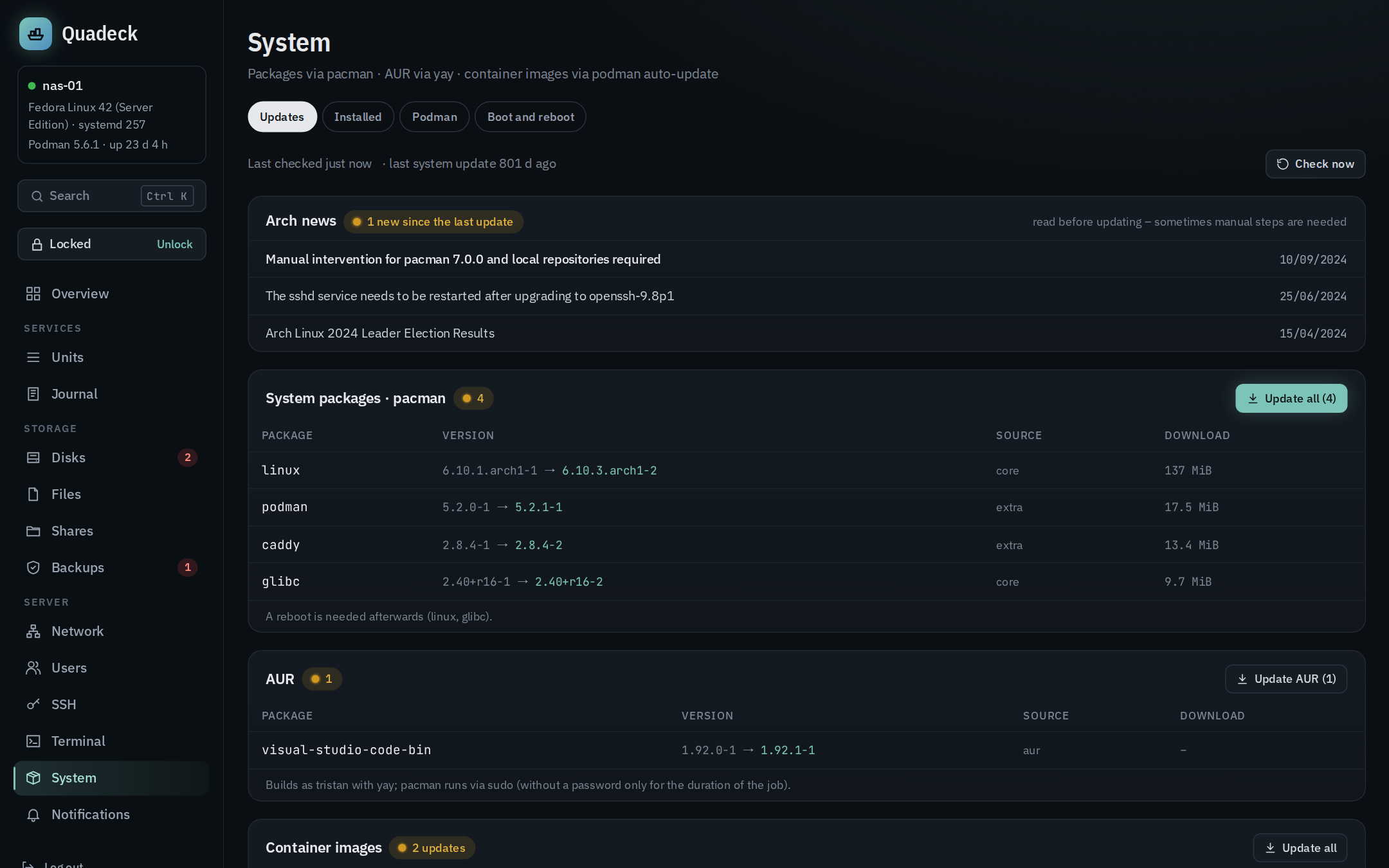
- System packages: package, old → new version, repository, download size. The list is
refreshed once an hour and on Check now. On Arch the check synchronises a copy of the
package database (like
checkupdates), never a partialpacman -Sythat would leave the system in a half-updated state. - Reboot recommended: when a kernel, systemd, glibc or similar package is in the list, and when the running kernel has already been replaced on disk.
- Arch news from the Arch Linux feed, with the ones newer than the last system update highlighted, because those are the ones that may need manual intervention.
- New config files:
.pacnewand.pacsave(Arch),.rpmnewand.rpmsave(Fedora, openSUSE),.dpkg-dist,.dpkg-new,.dpkg-oldand.ucf-dist(Debian),.apk-new(Alpine) that are waiting for a merge. A click shows what the file is for and the difference between yours (−) and the package's new one (+), with three ways out: - Keep mine …: the new file is deleted, yours stays.
- Take over new version …: yours is replaced (kept as
<file>.quadeck-bak, owner and mode stay). - Merge …: edit your version next to the diff and save exactly that text.
.pacsave files (your version of a removed package) can only be viewed and deleted. Some
files never get the package version: passwd, shadow, group, gshadow, shells,
fstab, crypttab, sudoers, hosts, hostname – the new one does not know your users,
disks or names, so only "keep" is offered. Taking over as it is is also refused when it would
break something: a mkinitcpio.conf whose MODULES/HOOKS/BINARIES/FILES differ from yours
(think sd-encrypt) and an smb.conf that holds your shares – merge instead. sshd_config is
checked with sshd -t and smb.conf with testparm before writing (nothing changes when they
refuse), sshd and Samba reload afterwards, locale.gen runs locale-gen, and a changed
mkinitcpio.conf starts mkinitcpio -P as a job.
- Update all starts the upgrade as a job. On Arch, AUR packages have their own
button.
- Container images: podman auto-update --dry-run for every container with
AutoUpdate=registry, with the result per container (update available, up to date, error).
Update all runs podman auto-update with rollback (a container that fails its
healthcheck after the update goes back to the old image); a single container's button pulls its
image and restarts its unit.
AUR
Updates are found through the AUR RPC. Building happens as a normal user with yay or paru,
because makepkg refuses to run as root: the first member of wheel/sudo, or QUADECK_AUR_USER.
For the duration of the job that user may run pacman through sudo without a password
(/etc/sudoers.d/zz-quadeck-aur, removed again when the job ends and on helper start). PKGBUILDs
are not shown; if you want to read them first, build by hand.
Package cache
The Package cache card shows how much space downloaded packages take and, on Arch with yay or paru, the AUR builds in the build user's home. The size is counted by the helper (allocated blocks, links not followed, other file systems skipped). Clean up … asks which of them to clean and runs the package manager's own tool as a job:
| System | Folder | Command | What stays |
|---|---|---|---|
Arch with paccache (pacman-contrib) |
CacheDir from pacman.conf, else /var/cache/pacman/pkg |
paccache -r -k2, then paccache -r -u -k0 |
the last two versions of every installed package, to go back with pacman -U |
Arch without paccache |
same | pacman -Sc |
the installed versions |
| Arch, yay / paru | ~/.cache/yay / ~/.cache/paru/clone of the AUR user |
find … -mindepth 1 -maxdepth 1 -type d -exec rm -rf --one-file-system as that user |
the helper's own files (yay's vcs.json tracks -git packages) |
| Debian, Ubuntu | /var/cache/apt/archives |
apt-get clean |
nothing |
| Fedora, Rocky | /var/cache/libdnf5 or /var/cache/dnf |
dnf clean packages |
nothing |
| openSUSE | /var/cache/zypp/packages |
zypper clean |
nothing |
| Alpine (with a local cache) | /etc/apk/cache |
apk cache clean |
the packages in world |
MicroOS and Fedora Atomic have no package cache of this kind; the card is not shown there. The AUR cache is never cleaned as root: a folder owned by root is refused. The job prints how much was freed.
Installed tab
All installed packages with search and filters: explicitly installed, dependencies, foreign (AUR, local), orphans. Per package: version, size, description; details show dependencies and required by.
Remove … first shows what would go: the package and every dependency that nothing else needs afterwards. Packages the system needs (kernel, systemd, glibc, the package manager, sudo, OpenSSH, Podman, Quadeck's own tools) are protected; the helper refuses them too, not only the UI. Packages can be selected and removed together; Remove all orphans … clears the orphan list in one go.
Podman tab
Podman's own settings (auto-update timer, AutoUpdate=registry for all containers, registries and
containers.conf) and what Podman keeps on disk – images, volumes, stopped containers, cleaning up
with a preview – are described in Units and Quadlets.
Boot and reboot
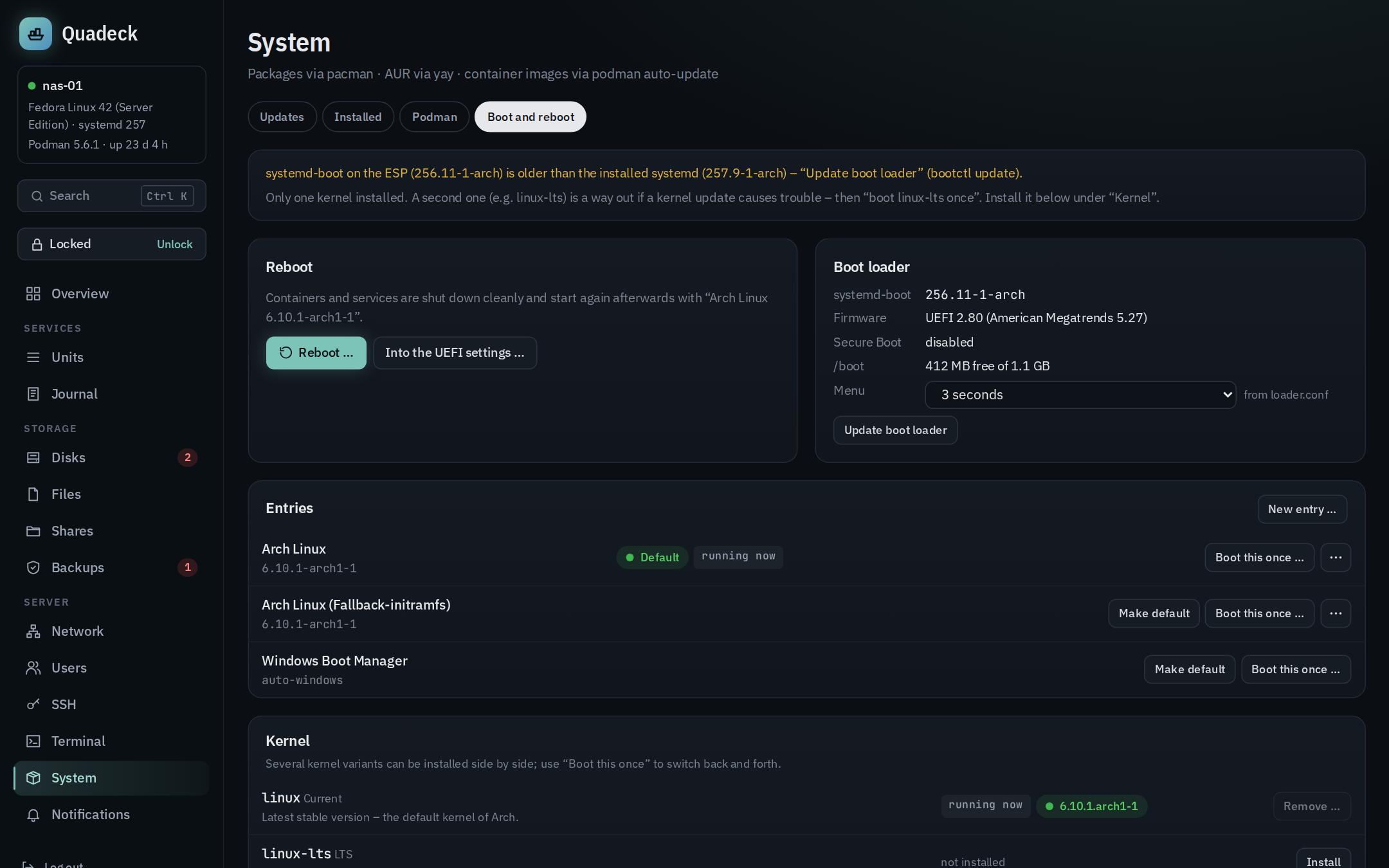
The Boot and reboot tab is about the step after an update: restarting into the new kernel, and making sure the server comes back.
- Reboot: reboots the server after a confirmation that names what boots and warns about a running job. The page waits and reloads itself when the server is back. Into the UEFI settings … reboots into the firmware setup when the firmware supports it (the server then waits there for someone at the machine). The "reboot recommended" banner on the other tabs links here.
- Entries (systemd-boot, from
bootctl list): kernel version, which one is the default, which one is running. Make default sets the default (bootctl set-default). Boot this once … boots once into another entry (bootctl set-oneshot) – for trying a new kernel or falling back to linux-lts; the reboot after that uses the default again, so a reset is enough when something goes wrong. A pending one-time entry is shown and can be withdrawn. Entries systemd-boot finds by itself (Windows, macOS, the EFI shell) get both buttons too; its "Reboot", "Power Off" and "Reboot Into Firmware Interface" entries are not listed, the page has its own buttons for that. - Editing entries (the
.conffiles inloader/entries, from the row menu "⋯"): Edit …, Make a copy …, Rename …, Delete … and New entry … (filled in from the default entry). The editor has two views of the same file: - Form: the title, the kernel and the initramfs and microcode files to choose from what is
on the boot partition (switching the kernel swaps the matching initramfs), and every kernel
parameter of the
optionsline with what it does – change, remove or add one, with suggestions for the parameters Quadeck can explain. Other lines (version,sort-key…) stay as they are. - Text: the file itself, for everything else.
A typo here can keep the server from booting, so:
- Every change is checked before it is written, live while typing: a kernel (linux, efi or
uki), every file it names exists on the boot partition (paths start with / there),
options contains root= when this system boots with one, unknown keys (typos) and missing
values. Errors block saving; the changes are shown as a diff first.
- The default and the running entry are never edited in place: Edit as a copy … opens a
copy (arch-copy.conf, title with " (copy)"). After saving, Quadeck offers Boot this once … – boot the copy once; if it fails, a reset brings back the old default. When it
works, Make default.
- Renaming a default or one-time entry moves that to the new name (bootctl set-default,
set-oneshot); the file name is the entry's id. Names: letters, digits, @ _ . + ~ -, ending
in .conf.
- Deleting refuses the default, the running and the one-time entry, and the last entry that
boots.
- Every version is kept (/var/lib/quadeck-helper/boot-history, 30 per file), also the text of
a deleted entry; older versions can be loaded into the editor and saved again. Writes are
atomic (temporary file, then rename).
- Boot loader: running systemd-boot version, firmware, Secure Boot, free space on $BOOT,
and the menu timeout (bootctl set-timeout; the EFI variable wins over loader.conf).
Update boot loader runs bootctl update when the binary on the ESP is older than the
installed systemd.
- Warnings before they bite: $BOOT too small for another kernel with its initramfs (the
classic reason a kernel update leaves an unbootable system), entries pointing to files that are
gone, an outdated loader on the ESP, no second kernel as a way back, no default entry.
- Kernel (Arch): linux, linux-lts, linux-zen and linux-hardened can be installed side
by side – one older version of the same kernel cannot, so a second flavour is the way to jump
back and forth. Per flavour: installed version, which one is running, whether it has a boot
entry. Install runs pacman as a job (with the -headers package when DKMS modules
such as NVIDIA or ZFS are installed, so they are built for it too). systemd-boot with classic
.conf entries does not get an entry for a new kernel by itself: Create boot entry …
copies the default entry (same options, microcode kept) with kernel and initramfs swapped,
shows the file first and writes loader/entries/arch-lts.conf – existing entries are not
touched. Then use Boot this once … or Make default. Remove … refuses the
running kernel, the one of the default entry and the last one (checked again inside the job);
the entry left behind is marked as pointing to missing files and can be deleted from its row
menu. On Fedora and Debian the
installed kernel versions come with their own entries and show up in the list of entries.
- Kernel parameters of this boot from /proc/cmdline, each known one explained
(i915.enable_guc, usbcore.autosuspend, nvme_core.default_ps_max_latency_us,
pcie_aspm, IOMMU, …). To change one, edit the options line of an entry – as a copy of the
default, booted once, as described above.
With GRUB the tab shows the reboot and the kernel parameters only. Writes to EFI variables go
through systemd-run, because the helper's own sandbox keeps /sys read-only.
Jobs
Everything that changes packages or files runs as a job with live output, one at a time:
- A job is a transient systemd unit
quadeck-job-<id>.servicestarted withsystemd-run. It keeps running when the update restarts Quadeck, Podman or the helper; the output is read back from the journal, so nothing is lost, and it stays in the journal afterwards (journalctl -u 'quadeck-job-*'). - Without
systemd-run(or withQUADECK_JOB_LAUNCHER=spawn) the job runs as a child process of the helper. - The job dialog follows the output live, can be closed and reopened from the job chip in the sidebar, and the last 20 jobs stay available.
- Progress bars and colours are cleaned up for the display. Package managers run
non-interactively (
--noconfirm,-y); questions they would ask are answered with the default.
Starting a job needs the unlock. Jobs run as root; the AUR build is the one exception described above.
When a job fails
--noconfirm answers "no" where a question has no safe default, so the package manager stops instead.
For a failed package job the dialog reads the output (in English: jobs run with LC_ALL=C.UTF-8),
marks the lines that matter and explains what happened and what to do next:
| Recognised | Next step offered |
|---|---|
| two packages in conflict (pacman) | In the terminal: pacman -Syu to confirm the swap yourself, Arch news |
| a file already exists (pacman), with or without an owning package | terminal |
| package signature unknown or untrusted | update the keyring, then the system (pacman -Sy archlinux-keyring, then pacman -Su) |
database locked by an interrupted run (db.lck) |
remove the lock and try again; the job refuses while pacman, yay, paru or makepkg runs |
| download failed (mirror down, file gone) | try again |
| not enough space | the package cache, Disks, terminal |
| an AUR package did not build (yay, paru, makepkg) | the package's AUR page, terminal |
| a missing key for an AUR package's sources | the key to import with gpg --recv-keys as the AUR user |
| apt: lock held by another process, dpkg interrupted | try again; In the terminal: dpkg --configure -a |
| anything else | the last error lines marked, terminal |
When pacman stopped before its transaction (conflicts, signatures, the lock, its own space check), the hint says so: nothing was changed. Copy error lines puts the marked lines on the clipboard.
"In the terminal" opens a new terminal session and types the command without running
it (with sudo when the shell is not root); Enter stays with you. Only commands from a fixed list can
be typed this way, so a link can't make the shell do anything.
Installing missing tools
The disks, shares and SSH pages show an Install button when smartmontools, Samba, the
NFS server or OpenSSH is missing, together with the command for the console
(sudo pacman -S --needed samba, sudo apt install samba, …). The button runs the same install as
a job and enables the service where one is needed.