systemd editor and timers
Quadeck edits systemd the way systemctl edit and systemctl cat do, with a form, a check before
saving and a history, and treats timers as what they are: the cron replacement.
Unit editor
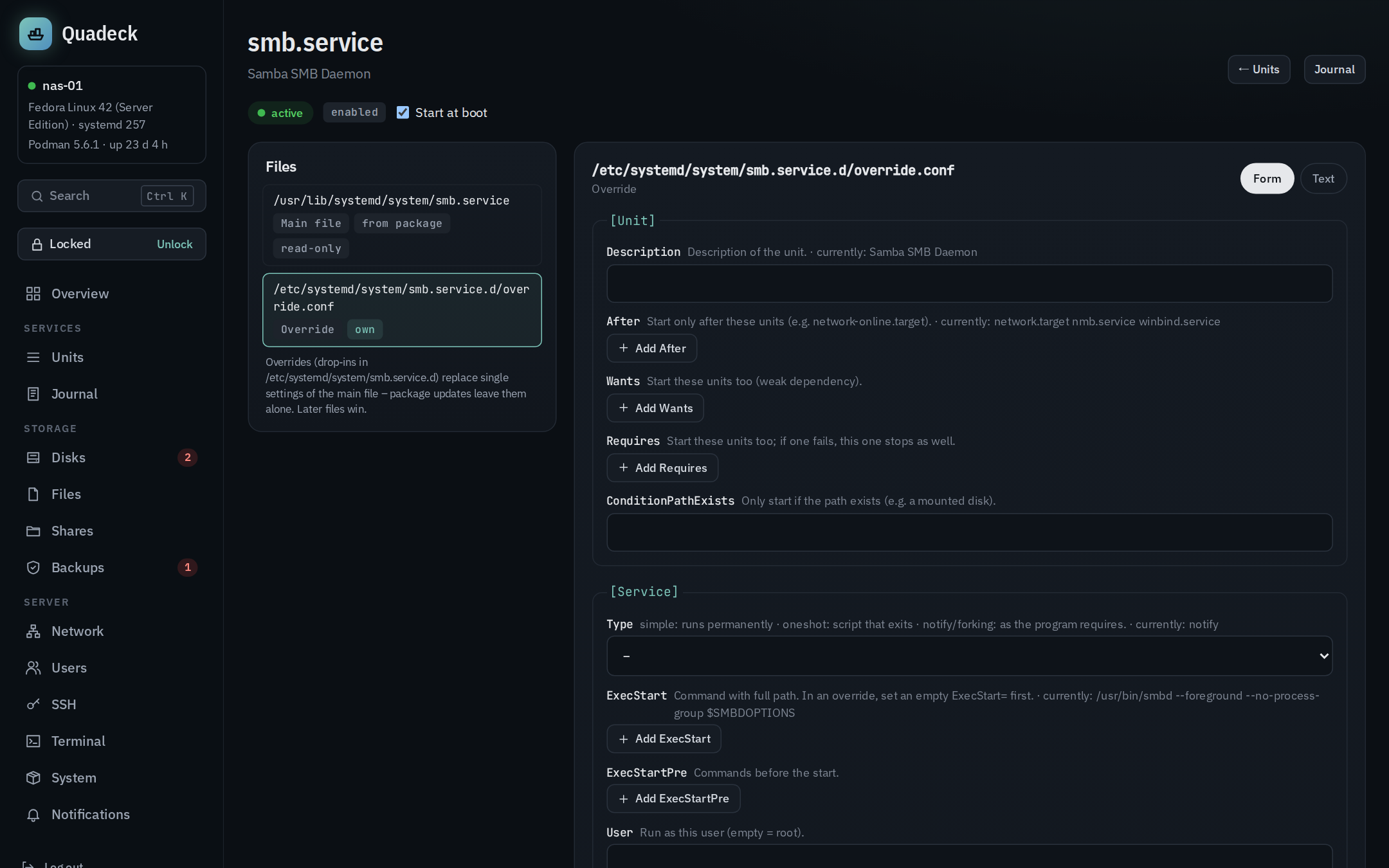
Edit unit on a non-Quadlet unit in the units list opens /systemd?unit=<name>. The page
shows every file that makes up the unit, as systemctl cat would:
- the main file (fragment), with its origin: from package (vendor,
/usr/lib/systemd/system), own (/etc/systemd/system), generated (a generator, for example Quadlet), transient (systemd-run); - the overrides (drop-ins in
<unit>.d/) in the order systemd applies them, later ones win.
Vendor files stay vendor files
A file from a package is shown read-only. Settings are changed through an override:
+ Add override creates /etc/systemd/system/<unit>.d/override.conf with only the keys you
set. Package updates leave it alone, Remove override restores the package default. Own units
in /etc/systemd/system are edited directly; only those can be deleted.
Quadlet-generated units get the same treatment: the generated file is read-only, overrides are possible, and the page points to the Quadlet file for changes to the container itself.
Instances of templates (foo@bar.service) show the shared template file; an override there applies
to the instance only.
Form and text
The form covers the keys that are usually worth changing, each with an explanation: description,
dependencies, conditions; command, user, group, working directory, environment, restart policy,
timeouts, memory and CPU limits, nice level, hardening (NoNewPrivileges, ProtectSystem,
ProtectHome, PrivateTmp, ReadWritePaths); for timers the schedule keys; WantedBy. In an
override every field shows what currently applies from the earlier files ("currently: …"). Keys the
form does not know are listed and stay as they are; Text edits the whole file.
Verification
Before saving, the file is checked twice: a syntax check in the browser (a key before the first
section, a line that is neither section nor Key=Value, a main file without any section), then
systemd-analyze verify on a copy in a temporary directory together with the main file. Errors
come back with line numbers and block saving; hints such as unknown keys, a missing program or a
missing dependency are shown but do not block.
One hint deserves a word: ExecStart=, OnCalendar= and ListenStream= are lists in systemd. An
override that sets ExecStart=/new/command adds a second command, which systemd refuses for a
simple service. The editor explains that an empty ExecStart= line must come first to reset the
list, and the templates do it that way.
Saving, history, enable
Save … shows the diff, offers a restart when the unit is active, writes atomically through
the helper and runs daemon-reload. A file that was changed on disk since it was loaded (another
tab, a package update, an edit on the shell) is not overwritten: the save is refused. Every version (the original before the first change, every
save, the content before a deletion) is kept under /var/lib/quadeck-helper/unit-history, up to
30 per file, and can be loaded back into the editor from History. Start at boot
switches systemctl enable/disable, like the Autostart switch in the unit's row.
Quadeck's own units (quadeck.service, quadeck-helper.service, quadeck-job-*) are read-only:
editing them could cut the branch Quadeck sits on.
New units
+ New unit on the units page creates a unit in /etc/systemd/system from a template: a
permanent service with restart on failure, a one-shot script at boot, a hardened service
(User=nobody, ProtectSystem=strict, ProtectHome, PrivateTmp, ReadWritePaths), or an
empty skeleton. The template follows the name you type until you edit the text. Create verifies
the file, writes it, reloads systemd and, if chosen, enables and starts it right away (start
only when the unit has no [Install] section).
Timers
Timers replace cron on a systemd host: a .timer starts a .service on a schedule, the output
goes to the journal, Persistent=true catches up on runs that were missed while the server was
off, and you can see when a timer last ran and when it runs next. Units → Timers is Quadeck's
schedule editor.
The list
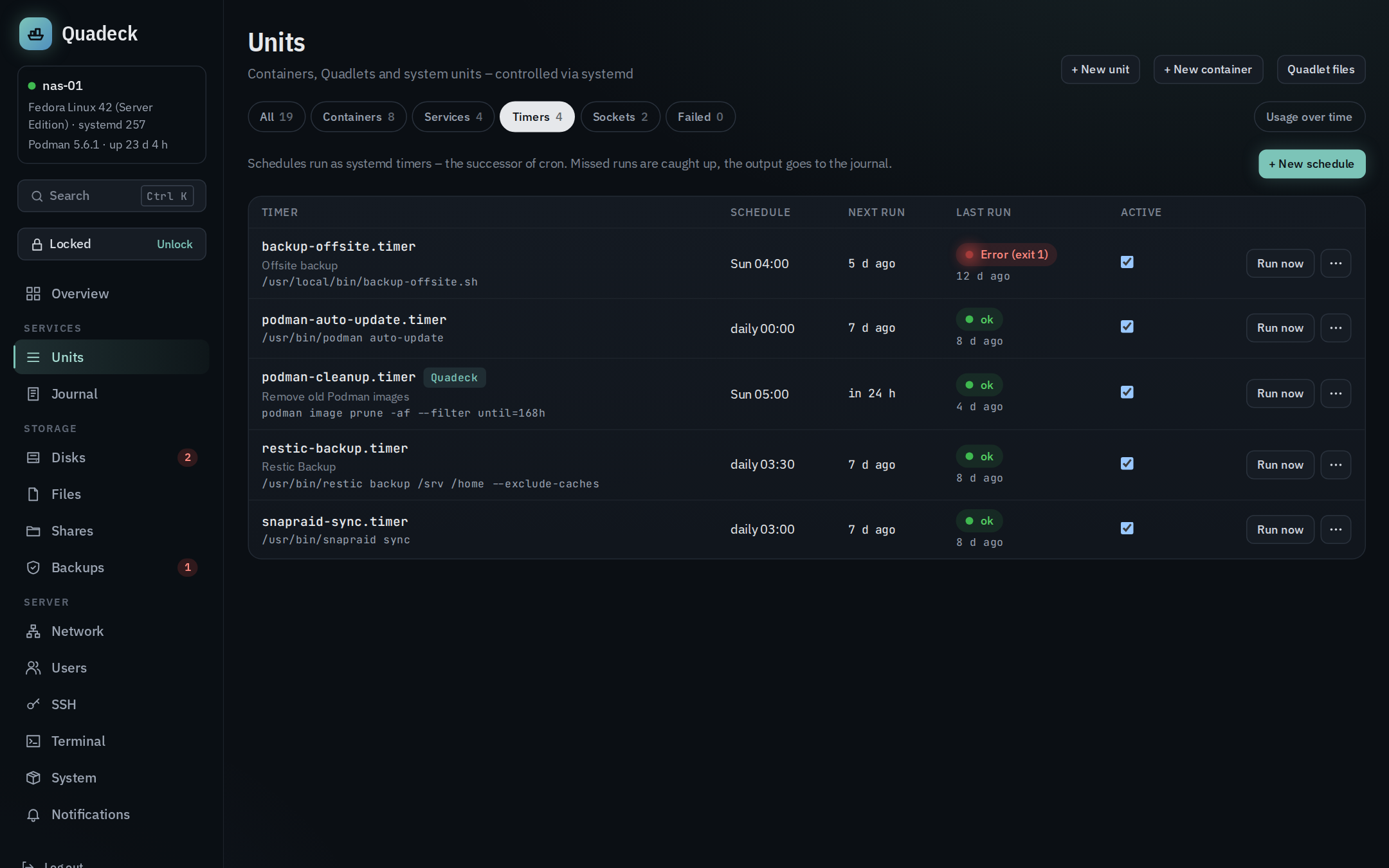
Every timer with its schedule in plain words ("daily 03:30", "Mon–Fri 07:00", "every 15 minutes"),
the next run, the last run with its result (ok, running, failed with exit code, never), whether it
is enabled, the service it triggers and the command behind that service (ExecStart of the
service). Timers Quadeck created carry a Quadeck chip.
Per timer: Run now starts the service once right now, the switch enables or disables
the timer, Journal opens the service's journal, a click on the name shows the unit files
(systemctl cat of timer and service) with links into the unit editor.
New schedule
+ New schedule creates a timer and its service in one go:
- Name (becomes
<name>.serviceand<name>.timer), description. - Command: run with
/bin/sh -c, several lines allowed, quoting is handled ($,%, quotes and backslashes are escaped for the unit file). - Schedule with the builder: every N minutes, hourly at a minute, daily at a time, weekdays
at a time, monthly on a day, or a custom
OnCalendar=expression. While you type, the next five runs are computed bysystemd-analyze calendarand shown; an invalid expression is reported. - Import from cron: a crontab line such as
30 3 * * 1-5 /usr/local/bin/backup.shis translated toOnCalendar=(ranges, steps, names,@dailyand friends included); the command is taken over. When both a day of month and a weekday are set, a hint explains that cron means or and systemd means and.@rebootis refused with a pointer to a plain unit. - As user, Working directory, and the options Catch up on missed runs (
Persistent=true), Wait for network (network-online.target), Low priority (Nice=10, idle I/O) and Start randomly up to … minutes later (RandomizedDelaySec). - Template: run a script, rsync backup, Podman image cleanup, SnapRAID sync and scrub, healthcheck ping.
- The Unit files tab shows the two files that will be written.
Saving verifies both files with systemd-analyze verify (on failure the previous files are
restored), reloads systemd and enables the timer (enable --now) unless Timer active is off.
The settings are stored as a comment in the service file, so the form can show them again.
If the files are later edited by hand, Quadeck notices and offers only the schedule override for
that timer from then on.
Other timers
Timers from packages or written by hand keep their files. Change schedule … changes only the schedule,
as a drop-in <timer>.d/50-quadeck.conf that resets OnCalendar= and sets the new one; monotonic
triggers (OnBootSec= and friends) stay. Restore default removes the drop-in. Only
timers Quadeck created can be deleted here.
Schedule expressions
Some OnCalendar= values the builder produces, for reference:
| Builder | OnCalendar= |
|---|---|
| every 15 minutes | *-*-* *:00/15:00 |
| hourly at :05 | *-*-* *:05:00 |
| every 6 hours | *-*-* 00/6:00:00 |
| daily 03:30 | *-*-* 03:30:00 |
| Mon–Fri 07:00 | Mon..Fri *-*-* 07:00:00 |
| 1st of the month 04:00 | *-*-01 04:00:00 |
systemd-analyze calendar '<expression>' on the host shows the same preview.