Network
The Network page shows the network side of the server: interfaces, listening ports with who is behind them, the firewall's view on those ports, routes and DNS. It answers "why can't I reach it?" and "what is listening on 8080?" without a terminal. Six tabs: Interfaces (interfaces, routes and DNS), Devices (who else is in the LAN, see below), Ports and Firewall only show; Reverse proxy edits the Caddyfile (see below); Speed test measures the connection (see below).
Interfaces
Every interface with its kind (LAN, Wi-Fi, VPN, Thread – the wpan0 of an OpenThread border router for Matter devices –, bridge, container, loopback, virtual), state,
IPv4 and IPv6 addresses (DHCP marked), the gateway on it, link speed, MAC, MTU and the bytes
received and sent since boot. Loopback and container-side veth interfaces are hidden by default;
a checkbox shows them.
Source: ip -j -d addr, /sys/class/net; without iproute2, Node's own interface list.
Devices
Every device in the home network: IP and MAC address, name, vendor and the services it announces, when it was first and last seen. Give a device your own name and a note, mark it as known – or let Quadeck tell you when an unknown one turns up.
- Scan: the root helper pings every address of the server's own private IPv4 subnets
(10/8, 172.16/12, 192.168/16 on LAN, Wi-Fi, bridge and bond interfaces – never VPN or
container networks, never the internet). A subnet wider than /22 is narrowed to the /24 around
the server's address, so a scan is at most 1022 pings.
fpingis used when installed (a second), otherwiseping64 at a time. The kernel's neighbour table (ip neigh) then has the MAC addresses; devices that block ping still show up there when they answer ARP. - Automatic: the neighbour table is read every 5 minutes (no traffic at all), a ping sweep runs every 30 minutes (15 min to 6 h, or off – Scan automatically). Scan now sweeps at once. A device is online when it was seen in the last 10 minutes.
- Names from reverse DNS (the router knows the DHCP names, e.g.
laptop.fritz.box) and from mDNS; services from mDNS (avahi-browse, packageavahi-utils): printers, scanners, AirPlay, Chromecast, Spotify Connect, HomeKit, Matter, SSH, SMB, Home Assistant, ESPHome … - Vendor from the IEEE OUI list the system already has (
hwdata,ieee-dataor nmap's list); without one, a short built-in list of common home network vendors (AVM, Raspberry Pi, Espressif, Ubiquiti, Synology, Sonos, Apple …). Phones and laptops use a random MAC per Wi-Fi network: no vendor, and a reset makes them a new device. - Details: your own name and note (also searchable), Mark as known, Check ports – 17 common TCP ports (SSH, DNS, HTTP(S), SMB, AFP, IPP, MQTT, RDP, VNC, Home Assistant, Plex, RAW printing …), only on request and only for addresses in the own subnets – and Wake up (Wake-on-LAN: the magic packet to UDP port 9 on the subnet's broadcast address; off in read-only mode). Forget removes a device; unnamed devices not seen for 90 days are forgotten by themselves.
- New device notification (Notifications, off by default): an unknown device that turns up after the first scan. Naming it or marking it as known ends the alert.
What Quadeck stores (MAC, IP, names, first/last seen, your notes) stays in its own database. Ping, port checks and Wake-on-LAN need no extra rights; the scan runs in the root helper because the web app's service may not be allowed to send ICMP.
Ports
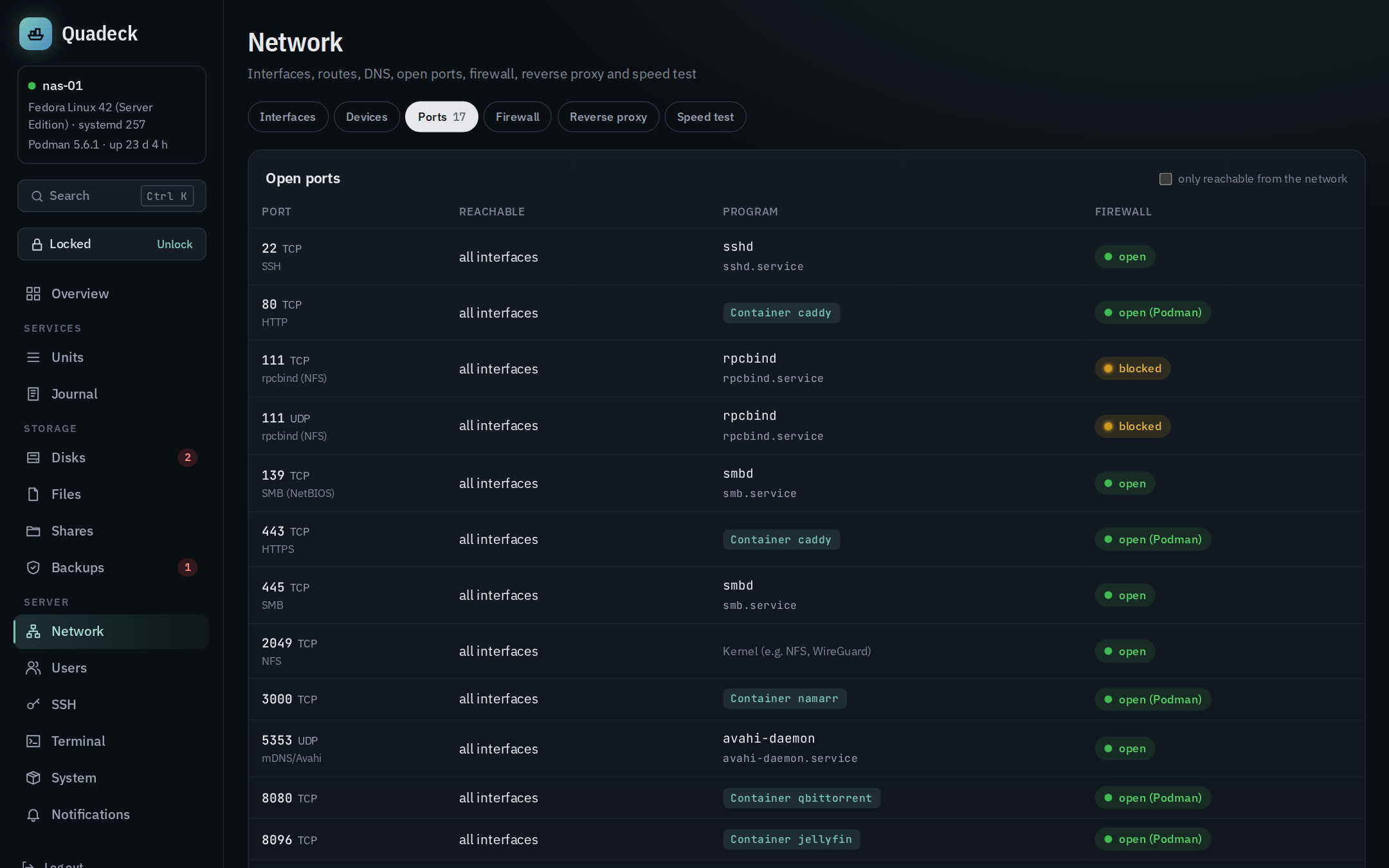
Everything listening on TCP or UDP (ss -tulpn, run by the root helper so process names are
available), IPv4 and IPv6 sockets of the same program merged into one row:
- Port and protocol, with a name for well-known ports (SSH, SMB, NFS, DNS, mDNS, HTTP, …);
- Reachable: all interfaces (0.0.0.0 or ::), this machine only (loopback only) or a specific address;
- Program, with the systemd unit it belongs to (from the process's cgroup; links to the unit editor) or the container (from the libpod cgroup, or because Podman published the port). Published container ports usually have no socket of their own in rootful Podman, so they are added from the container list;
- Firewall: see below.
only reachable from the network hides the loopback-only rows.
Firewall
Quadeck detects firewalld (default zone, services resolved to their ports, open ports) and ufw (allow rules, app profiles). For every port that is reachable from the network it says:
| Verdict | Meaning |
|---|---|
| open | the firewall allows it, or there is no firewall |
| blocked | something listens, but the firewall drops connections from the network |
| open (Podman) | a published container port; Podman adds its own forwarding rules |
| unclear | hand-written nftables rules with a drop policy; Quadeck does not interpret them |
Ports that are listening but blocked are listed in the firewall tab with the command to open
them (firewall-cmd --permanent --add-port=… && firewall-cmd --reload or ufw allow …).
Whether that is what you want is your call; often a blocked port is exactly right.
Without a firewall the card explains what that means at home: everything that listens on all interfaces is reachable in the LAN, and from the internet only what the router forwards.
Routes and DNS
Hostname, default gateways for IPv4 and IPv6 with the interface, DNS servers (behind
systemd-resolved the real upstream servers from resolvectl), search domains, and the full
routing table on request.
Reverse proxy
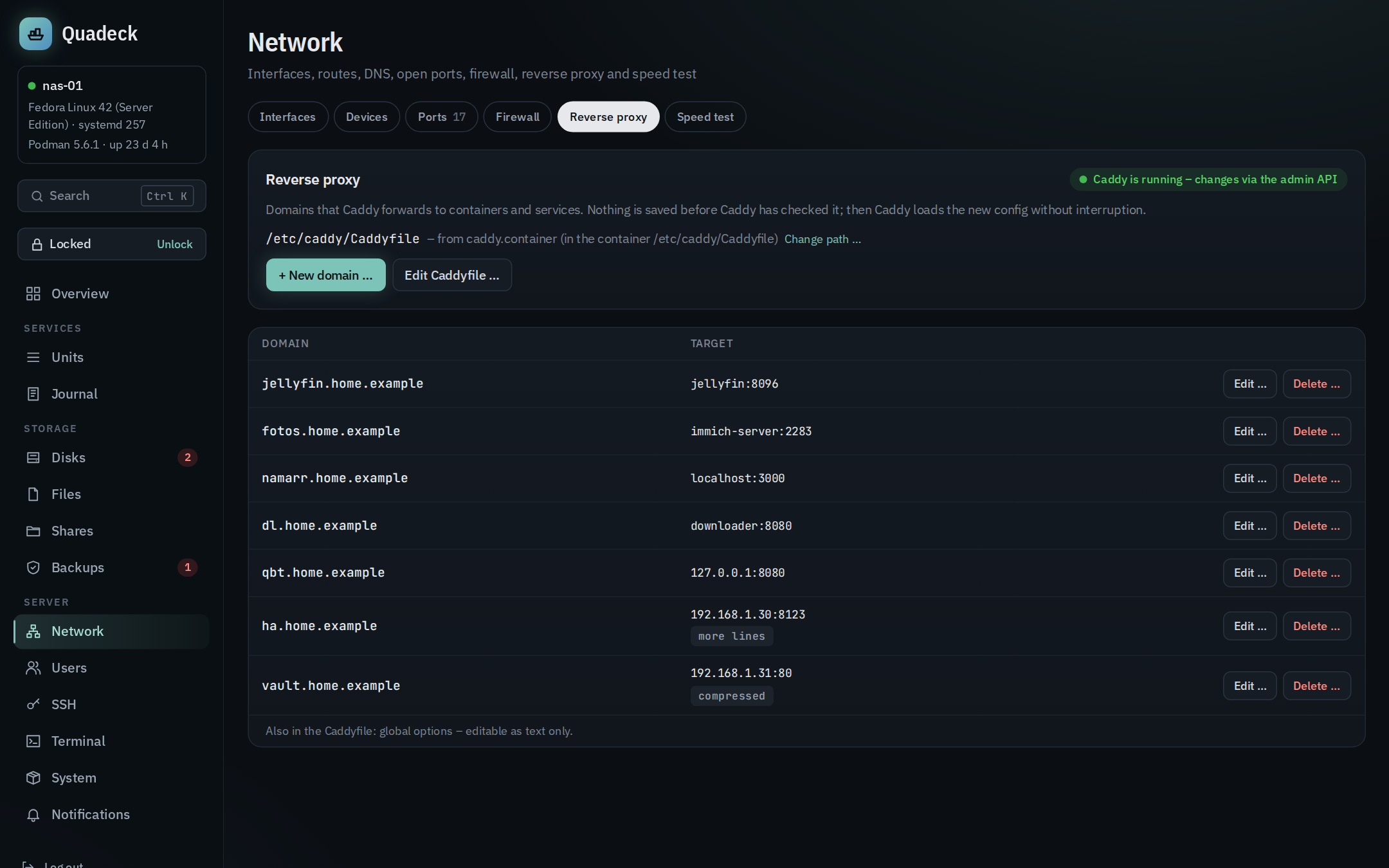
The tab Reverse proxy edits the Caddyfile: each site block is a row (domain → target, with the options it uses). New domain and Edit open a dialog for that one entry:
- Domain(s) (several separated by commas) and Target (several separated by spaces: Caddy
balances the load).
Suggestions are the containers with a published port (
localhost:<port>). - Only reachable from the home network – requests from outside private address ranges (LAN,
VPN) get 403 (
@outside not remote_ip private_ranges+respond @outside 403). - Password protection –
basic_authwith one user. The password is turned into a bcrypt hash on the server; only the hash is written. Editing again keeps it unless a new one is typed. - Compression –
encode zstd gzip. - Target uses HTTPS with its own certificate – for Proxmox, UniFi and the like:
transport http { tls_insecure_skip_verify }. - Local certificate –
tls internal, for names that do not exist on the internet. - Advanced: further lines inside
reverse_proxy { … }(e.g.header_up) and further lines of the block. Whatever the dialog does not know is kept there as written – nothing gets lost.
Blocks that are more than "domain → one target" (several reverse_proxy with paths, file_server,
handle …) are edited as text (Edit as text …) – only that block, not the whole file. Global options, snippets and
import stay as written; Edit Caddyfile opens the whole file.
Which file. The first that applies:
QUADECK_CADDYFILEin/etc/quadeck/quadeck.env– fixed, cannot be changed in the UI.- A path picked in the UI (Change path …), remembered by the root helper.
- The Caddy Quadlet (image
caddy,caddy-…): the path inside the container comes fromExec=… --config …or the image default/etc/caddy/Caddyfileand is mapped to the host through itsVolume=lines (a mounted file, a mounted directory or a named volume). This works while the container is stopped. If the Caddyfile is not mounted, it lives in the image and changes would be lost – Quadeck shows it read-only and names theVolume=line to add. caddy.serviceon the host (--configof itsExecStart)./etc/caddy/Caddyfile, if it exists. Otherwise the tab asks for the path.
The tab always shows which file is used and where it came from.
Saving shows the diff first, then:
- Caddy checks the new version – through the admin API (
POST /adapt) when it is reachable, otherwise withcaddy validatein a throwaway container of the same image and mounts, or thecaddybinary on the host. If Caddy rejects it, nothing is written and its message is shown. - The previous version goes to the history (History, restorable).
- The file is written in place (same inode, owner and mode): a Caddyfile mounted as a single file would otherwise still show the old version inside the container.
- Caddy reloads without interruption – admin API (
POST /load), elsepodman exec <container> caddy reload, elsesystemctl reload caddy. If the reload fails, the old file is restored; Caddy keeps running with its previous config. When Caddy is not running, the file is only saved and read at the next start.
A change made elsewhere in the meantime is noticed (hash of the file) instead of being overwritten.
New domains appear as tiles on the overview right away. Writing needs the
unlock; QUADECK_CADDY_ADMIN (default http://localhost:2019) is the admin
API address.
Speed test
The tab Speed test measures two things, each with a live gauge (logarithmic up to 10 Gbit/s), the steps ping → download → upload and a curve while it runs:
- This device ↔ server – how fast the Wi-Fi or LAN between the browser and the server is. The browser downloads random test data from the server for six seconds over four connections, then uploads for six seconds; ping and jitter come from ten small requests before. Through a reverse proxy this includes the proxy.
- Server ↔ internet – the server's own connection, measured by the web app against Cloudflare
(
speed.cloudflare.com:__downand__up), the same way (eight pings, then six seconds each over four connections). The result names the Cloudflare location that answered (e.g. FRA). No root and nothing to install; only one test runs at a time.
Every result shows Mbit/s and MB/s (Mbit/s ÷ 8): connections are sold in Mbit/s, file sizes are in bytes. The last 50 results are kept in a history.
Measure automatically (off by default): daily or every six hours from a chosen hour (a fixed random minute per server). Only the internet test runs on its own – the device test needs a browser. Each run downloads at full speed for a few seconds (about 400 MB at 500 Mbit/s), so with a data cap daily is the better choice. Manual and automatic results go into a graph over 7, 30, 90 or 365 days (download and upload, ping below); speed results are kept for a year.
Notification – the rule Internet slow or down on the notifications page, off by default. The limit is relative (below a share of the usual download, the average of the last 7 days, default 50 %) or a fixed value in Mbit/s. A slow or failed run is measured again 15 minutes later; only when that one is bad too, the notification goes out, and an all-clear follows once a run is fine again.