Backups
The Backups page (in the menu under Storage) backs up the server with restic: encrypted, deduplicated, on a schedule, with snapshots you can browse and restore from the page. Without restic the page offers to install it.
Setting up
The target comes first, the plan afterwards – the same way as a client is connected first and planned later.
Set up backup … asks only where to. Set up creates the repository there (restic init)
or opens the one that is there, and saves a plan without folders. Nothing is backed up yet and no
timer runs: the page says Target set up – nothing chosen to back up yet (not active), with
Choose and the command for an agent (quadeck backup plan set -f plan.json).
Choose and Edit plan … open the plan with three tabs, Where, What and When, to switch between freely; Save saves all of it. When a plan gets its first folders, the first backup can start right away (Start the first backup right away, on by default).
- Where: a file system (a second disk, a USB disk, a NAS mount), SFTP (a NAS or another server), S3 or compatible (MinIO, Wasabi …), Backblaze B2 or a restic REST server.
- For a file system, a folder browser below the field walks the server's whole file system (folder names only, read by the root helper). It shows the disk the folder is on with its free space, and warns when that is the same disk as folders that are backed up.
- The parent folder must exist; the last part is created. When the disk is not mounted, nothing is created on the system disk by mistake.
- SFTP runs as root: root needs an SSH key without passphrase for the target (
ssh-copy-idas root). - Credentials (
AWS_ACCESS_KEY_ID/AWS_SECRET_ACCESS_KEY,B2_ACCOUNT_ID/B2_ACCOUNT_KEY,RESTIC_REST_USERNAME/RESTIC_REST_PASSWORD) are stored in a file only root can read. They never travel back to the browser; an empty field keeps the stored value. - What, with the exclusions:
- Choose folder … adds any folder of the server through the folder browser (hidden folders
on request). The chosen folders are listed, each with a button to remove it. The page does not
suggest folders from the Quadlets any more;
quadeck backup suggestandplan draftstill do, for an agent. - A problem with a folder shows at that folder: a folder inside a local target (or the target itself) cannot be backed up. A folder that holds the target is fine: the target is left out by itself (added to the excluded folders), since restic must not back up its own repository.
- Named volumes of an older plan (
volume:<name>) are resolved to their folder on the host (podman volume inspect) at every run. - Exclusions: caches (folders marked with
CACHEDIR.TAG), temporary files, logs, folders containing a.nobackupfile; Exclude a folder … through the browser; your own restic patterns; an optional size limit per file. - Measure size runs
duon the chosen folders and shows the size per folder and how much the excluded folders save. - When, in two separate boxes:
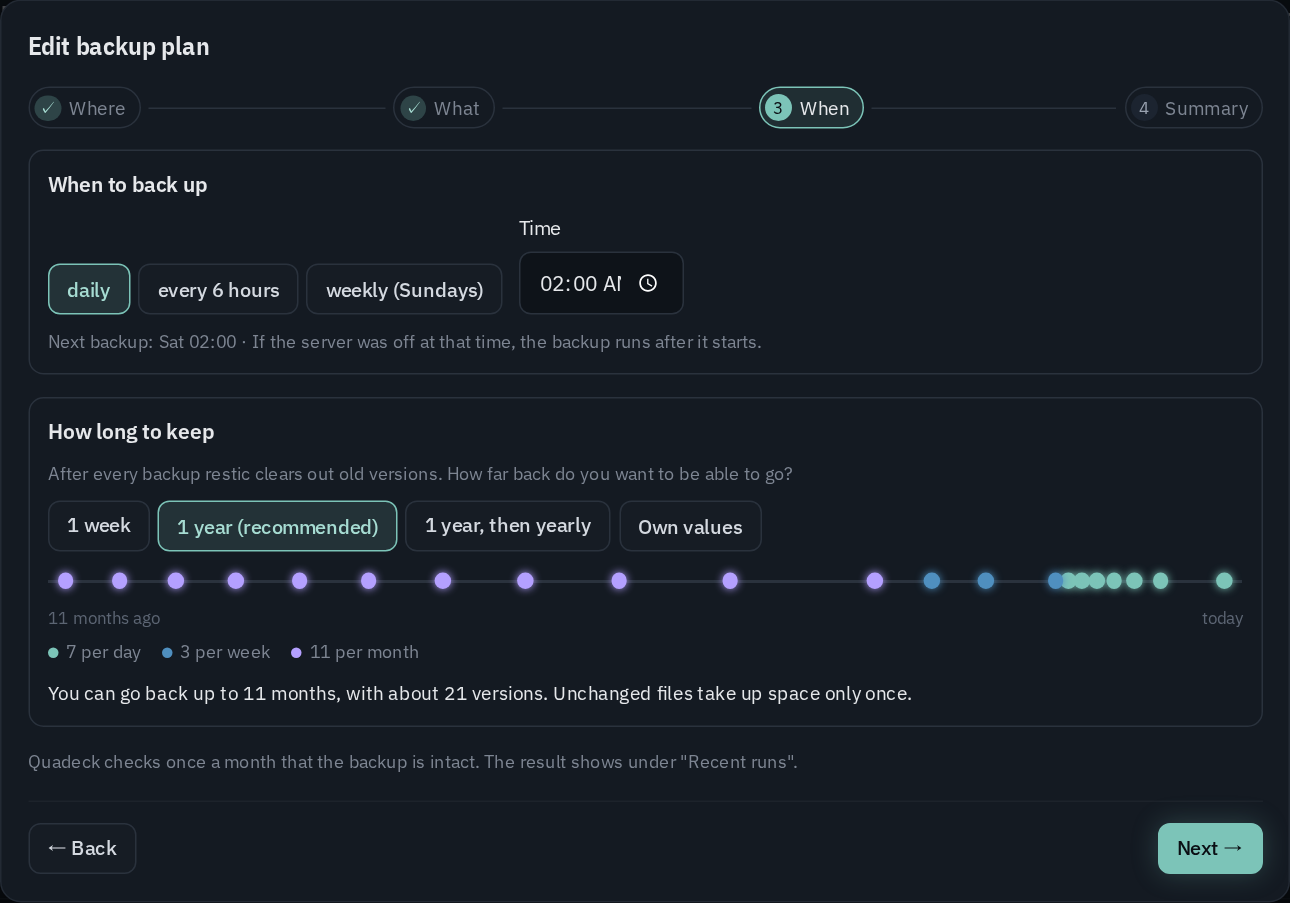
- When to back up: daily, every 6 hours or weekly (Sundays), at a time you choose, with the
next run. A run missed because the server was off follows after the start (
Persistent=true). - How long to keep: after every backup
restic forget --pruneclears out old snapshots. The choice is how far back you can go: 1 week (7 daily), 1 year (7 daily, 4 weekly, 12 monthly, the default), 1 year, then yearly (plus 10 yearly) or own values. A timeline shows which snapshots stay, with how far back and about how many. - The repository check (
restic check, reading 5 % of the data) runs monthly by itself; its result shows under Recent runs.
Containers are not stopped during the backup any more. A plan from before that still lists units to stop shows them on the page; saving it again clears them.
An existing repository is opened, never replaced: if it cannot be opened (for example a wrong password), saving stops with restic's message.
The repository password
Quadeck generates the password when the backup is first set up and stores it readable only for root. Show password … displays it after the unlock, to copy or download. Keep it somewhere other than this server, in a password manager or on paper. With the password and the target, the backups open with restic on any computer. Without it, they cannot be read at all. Until you confirm Stored safely, the page reminds you.
To read the repository by hand on another machine:
export RESTIC_REPOSITORY=/mnt/backup/restic   # or sftp:…, s3:…, b2:…, rest:…
restic snapshots          # asks for the password
restic restore latest --target /tmp/restore --include /srv/immich/upload
Status and runs
- Status: the last backup with its result, duration and new data; the next run; the repository size and snapshot count; the target with its free space.
- Back up now and Check repository start the systemd units right away.
- Recent runs: a bar per backup for the new data, each run with its duration, and the messages of a run that finished with warnings (files that could not be read).
- Snapshots: every snapshot with the number of files, new and total data. The list is read from the repository after every run; Read again reads it now.
Browsing and restoring
Browse opens a snapshot like a file browser:
- Each entry is compared with the server today: deleted, changed or unchanged.
- Download gets a single file. A folder comes as a zip (
restic dump). Downloads need the unlock, because a backup holds files only root may read. - Restore … runs as a job with live output (
restic restore): - Into a new folder (default
/srv/restore/<date>): the files land there with their full path. - In place: overwrites today's files with the snapshot's. It asks first, and stops the containers of the plan and those whose folders are restored, starting them again afterwards.
How it runs
- Two systemd units in
/etc/systemd/system, visible on the units page: quadeck-backup.servicewith its.timerrunsquadeck backup run.quadeck-backup-check.servicewith its.timerrunsquadeck backup check.- The timers are
Persistent=true: a run missed while the server was off is caught up after booting. - A plan without folders (only the target) has no units and no timer; they are written with the first folders and removed when the last one goes.
quadeck backup run:- stops the units of an older plan that still lists some,
- runs
restic backupwith the exclusions, taggedquadeck, - starts those units again,
- applies the retention (
restic forget --prune --tag quadeck), - records the run and reads the snapshot list.
Its output is in the unit's journal.
- Switch backups off removes the schedule. The repository with all snapshots, the password and
the credentials stay, so switching on again continues with the same repository.
- Files: /var/lib/quadeck-helper/backup/ (mode 700) holds plan.json, password, env
(credentials), the generated exclude file, the run records and restic's cache. Set
QUADECK_BACKUP_DIR to move it.
From the command line (and for agents)
quadeck backup … does on the server, as root, what the page does. Every command takes --json,
so a script or an AI agent can look around, suggest a plan and set it up; quadeck backup guide
prints the steps for an agent. quadeck backup skill install writes them as a skill for Claude Code
(~/.claude/skills/quadeck-server-backup/SKILL.md, no root needed): asked about backups on the
server, Claude Code then knows the commands by itself.
sudo quadeck backup status                 # plan, last runs, next run, repository ("active": false: target only)
sudo quadeck backup suggest                # folders from the Quadlets, with the reason when not suggested
sudo quadeck backup dirs /srv              # sub-folders, the disk and its free space
sudo quadeck backup sizes /srv/app --exclude /srv/app/cache
sudo quadeck backup plan draft > plan.json # the folders the Quadlets suggest, at the current target, to edit
sudo quadeck backup plan set -f plan.json --dry-run   # what changes, sizes, warnings; saves nothing
sudo quadeck backup plan set -f plan.json  # save: opens or creates the repository, writes the timer
sudo quadeck backup run                    # back up now
sudo quadeck backup clients                # the clients: plan, online, waiting
sudo quadeck backup client plan set laptop -f laptop.json [--dry-run]
- The plan is the same JSON the page stores, checked the same way;
plan show --jsonprints the current one. A plan withoutpasswordSavedkeeps the current confirmation. Emptypathsis a plan too: only the target, no timer;statusthen says Target set up, no folders yet and how to go on. - Credentials of S3, B2 or REST targets come from a file with
--secrets <file>(KEY=valuelines), never from the command line; left out, the stored ones stay. --dry-runlists every change (+added,-removed,~changed), the size of the folders with what the excluded folders take, the target's disk, and warns when the target is on the same disk as the data.- Exit codes: 0 done, 1 failed, 2 a usage error or a plan that does not pass the checks. With
--jsonan error comes as{ "error": "…" }. clientsshows per client whether it is connected and online, whether it has a plan and runs its current version, and tasks still waiting for it.client plan setstores a client's plan as changed with the CLI; the computer picks it up within about 10 minutes.
Backup target for clients
The Clients tab turns the server into the backup target for the other computers at home: one restic rest-server for all of them, each with its own repository and its own access.
Set up backup target … asks for:
- Data folder: one folder per client below it. The parent folder must exist. The same folder browser as for the server's target walks the file system below the field, with the disk and its free space.
- Port: the rest-server is published on it.
- Address for the clients: what the computers use, e.g.
http://nas.lan:8000. For HTTPS, add a domain in the reverse proxy pointing atlocalhost:<port>and enter it here. - Append only: optional. Clients can add snapshots but not delete them, so an infected computer cannot destroy its backups. Clients then cannot remove old snapshots either.
It writes quadeck-rest-server.container (image restic/rest-server, --private-repos) through the
Quadlet editor's checks and history, and starts it.
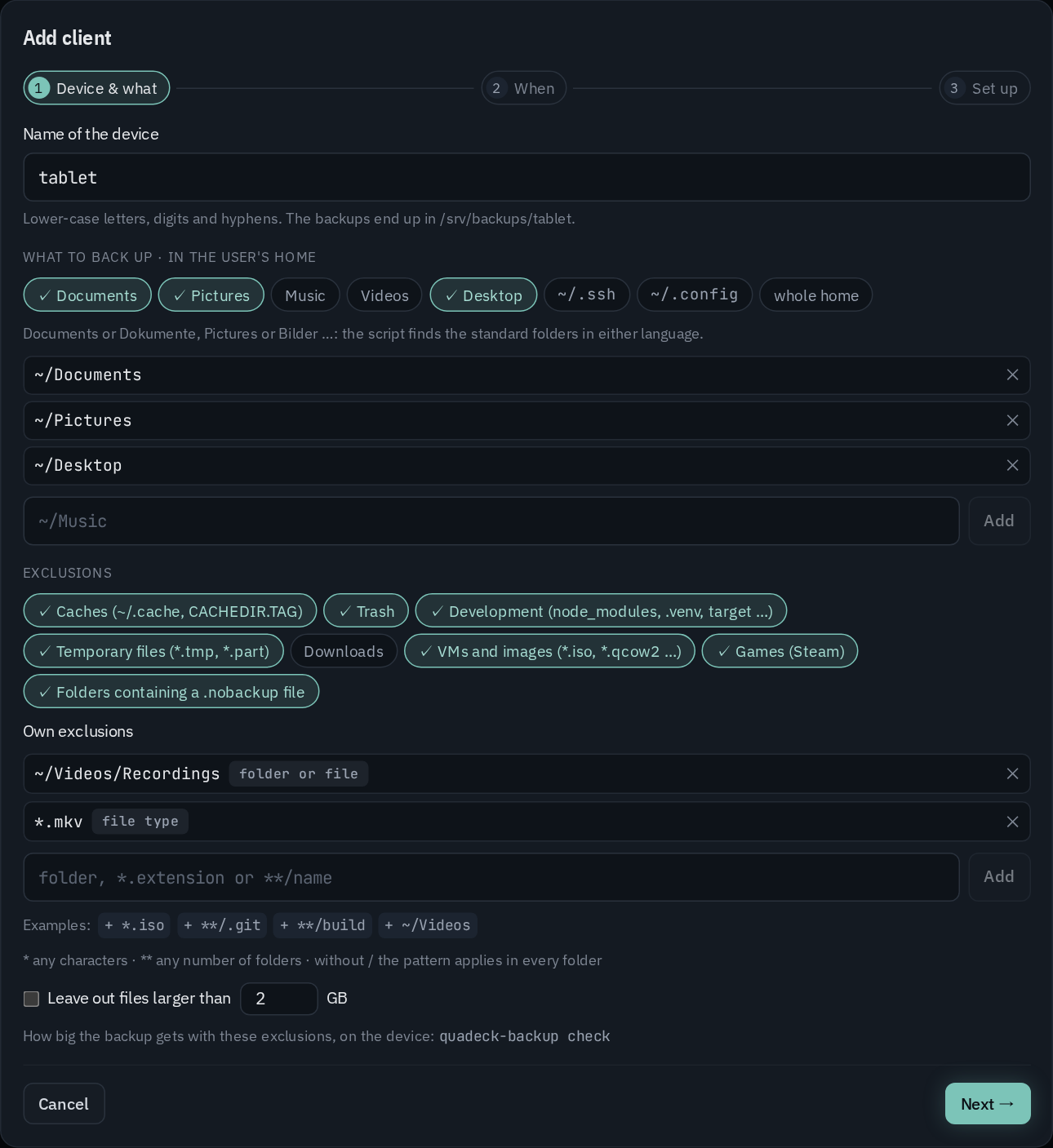
A computer is connected first and planned afterwards: + Add client asks only for its name, then shows the command for the computer. What and when it backs up is set once it is connected: here with Set plan, by an AI agent on the computer, or with the CLI on the server.
Connecting a computer
The name: lower-case letters, digits and hyphens; the backups land in <data folder>/<name>.
Create saves the client and shows a one-liner for it, with three numbered steps (open a
terminal as the normal user, paste the command, choose the repository password):
- The link is good for 30 minutes or until the computer has connected, whichever comes first. It needs no login: the link itself (192 random bits) is the authorisation.
- It can be fetched more than once until then – reviewed first, or the script run again after it stopped half-way (restic missing, server not reachable). Every fetch carries the same access and token, so an earlier half-done install keeps working.
- An expired link, or one whose computer is set up, answers with a message to create a new one (Show command in the row menu).
- Review first shows the same as download, check, run.
Quadeck over HTTPS with Caddy's local CA. When the browser has Quadeck open over https:// and
Caddy gives that address a certificate of its own CA (tls internal in the site, also through an
imported snippet, the global local_certs, or a name Caddy never asks a public CA for: localhost,
IP addresses, .local, .internal, .home.arpa), the computer usually does not trust it yet. The
command then brings the CA along, checked by its fingerprint:
curl -fsSLk https://quadeck.lan/ca.crt -o /tmp/quadeck-ca.crt && echo "<sha256> /tmp/quadeck-ca.crt" | sha256sum -c && curl -fsSL --cacert /tmp/quadeck-ca.crt https://quadeck.lan/api/backup/script/<setup link> | sh
/ca.crtserves Caddy's root certificate without a login (it is public). Quadeck reads it from the Caddy Quadlet's data volume ($XDG_DATA_HOME/caddy/pki/authorities/local/root.crt,/datain the official image, mapped to the host throughVolume=) or from/var/lib/caddy/.local/share/caddy/…for Caddy from the distribution package. Without one it answers 404.- The CA is fetched without checking (
-k), butsha256sum -ccompares it with the fingerprint in the command – which came from the browser's own verified connection – before anything else happens. Only then is the script fetched, with that CA as the only one to trust. Nothing that runs comes unchecked. The command works insh,bashandfish. - The script carries the CA (it came over the connection checked against it) and keeps it in
~/.config/quadeck-backup/ca.crt; every call ofquadeck-backupto Quadeck usescurl --cacertwith it. restic gets it too (RESTIC_CACERT) when the repository's address is served by Caddy with the same CA. - Review first shows the same steps, plus the CA's fingerprint as the browser shows it in the certificate details, to compare.
- Over
http://, or with a certificate from a public CA (Let's Encrypt …), the command stays the short one above. If Caddy's CA changes later,quadeck-backupsays so: run the command from Show command again.
While the computer has not run the command yet, the dialog says it is waiting and notices within seconds when it has; then Set plan opens the plan.
The script is POSIX sh and is run as the normal user, not as root. It:
- checks that restic and systemd are there (and names the install command if restic is
missing:
brew install resticwhere Homebrew is,rpm-ostree install resticon an atomic system, else the package manager), and remembers where restic is (the user units do not get the login shell'sPATH), - writes
~/.config/quadeck-backup/(mode 700): the access (renewed with every link, so only the newest link's access works), the folders and the exclusions of the plan if there is one, - asks once for the repository password and keeps it in
~/.config/quadeck-backup/password. It encrypts the backups and never leaves the computer. On a later run the script only checks that it still opens the repository, - connects to the rest-server (says so, and gives up after 30 seconds with the reason when it
cannot reach it) and creates the repository on the first run (
restic init), - installs
~/.local/bin/quadeck-backupand the user units:quadeck-backup.serviceand.timerfor the backups on the plan's schedule (Persistent=true: a run missed while the computer was off is caught up; off while there is no plan or the plan is paused), andquadeck-backup-agent.serviceand.timer, which ask Quadeck every 10 minutes (see below), - tells Quadeck that it is set up (this ends the link and marks the plan as arrived) and sends the folder list in the background.
Without a plan it ends with connected – no backup plan yet: nothing is backed up until a plan
comes. The script hints at sudo loginctl enable-linger <user> when the user's timers only run
while the user is logged in.
The client's plan
A row without a plan says Connected – no plan yet, with:
- Set plan: the plan editor, starting from the recommended plan,
- Use the recommended plan: Documents and Pictures (named in the UI's language; the script finds either name) weekly, with the default exclusions and retention, in one click,
- the commands for an agent:
quadeck backup client plan set <name> -f plan.jsonon the server,quadeck-backup plan seton the computer.
Edit … in the row menu opens the same editor with two tabs:
- What:
- the standard folders as a quick choice (Documents, Pictures, Music, Videos, Desktop,
~/.ssh,~/.config, the whole home) and any other folder (~is the home of the user who runs the script, or an absolute path). The script finds a standard folder under either language (~/Dokumenteor~/Documents) or wherexdg-user-dirsput it. - Choose a folder … browses the computer's folders, with their size and what they are (caches, development folders, Steam, a git project …). The computer sends this list itself (see How the client talks to Quadeck); until it has, the editor says how to get it.
- What the list finds inside the chosen folders that a preset would leave out is shown above the exclusions, with its size and Leave out to switch the preset on.
- Exclusions: presets (caches, trash, development folders like
node_modules,.venv,target…, temporary files, downloads, VM images, Steam, folders with.nobackup) and own rules as a list, each labelled as folder or file, file type (*.mkv) or pattern (**/build), with examples to add in one click. A rule that would leave out everything (/,~,*…) is refused. Plus an optional size limit per file. - When: hourly, every 6 hours, daily or weekly; how long to keep with the same presets and timeline as the server backup (1 week, 1 year, 1 year then yearly, own values); a warning after N days without a backup; active (off pauses the backup timer on the client).
Save stores the plan with a new version. The computer takes it within about 10 minutes (its agent timer) or, at the latest, before its next backup; until then the row says waiting, then arrived ✓. Who changed the plan last and when is shown below: in Quadeck, with the CLI, or on the device. Running the command again is never needed for a new plan.
On the client:
quadeck-backup now |
back up right now |
quadeck-backup check [--files] |
dry run: the size without and with the exclusions, how much they leave out and what the next run would upload; --files lists the files |
quadeck-backup status |
the last backups and the next run |
quadeck-backup scan [--json] |
send the folder list to Quadeck now (also once a day after a backup) |
quadeck-backup sync |
fetch new settings from Quadeck now (also before every backup) |
quadeck-backup poll |
ask Quadeck for a new plan or a task (what quadeck-backup-agent.timer runs every 10 minutes) |
quadeck-backup plan show / plan set -f <plan.json> |
the plan as JSON (plan is null without one) / set a new one from the computer |
quadeck-backup check --plan <draft.json> [--json] |
the dry run for a draft plan, without saving it |
quadeck-backup guide [--skill] |
the steps for an AI agent that sets up this backup with you |
quadeck-backup skill install |
the same as a skill for Claude Code (~/.claude/skills/quadeck-backup) |
quadeck-backup mount [dir] |
the backups as folders under ~/Backup (needs FUSE) |
quadeck-backup restore <path> [dir] |
restore from the latest backup |
quadeck-backup uninstall |
remove both timers and the command (settings and password stay) |
On an append-only target the clients skip forget; old snapshots stay.
How the client talks to Quadeck
Every setup link carries a token for this computer, renewed with every new link (Quadeck keeps
only its SHA-256, in the helper). With it, quadeck-backup talks to
<Quadeck>/api/backup/agent/<name>, the address the browser used when the command was created.
Quadeck never sends commands: only data, which the client checks line by line.
- Poll: every 10 minutes (randomised by up to 2 minutes, caught up after the computer was
off)
quadeck-backup-agent.timerasks for the plan's version and the tasks waiting for it. A new version is fetched right away; the tasks are handed out once: back up now startsquadeck-backup.servicewithout waiting for it, refresh folder list sends a new one. Any other word is ignored. The backup timer does not depend on it: backups run on schedule even when Quadeck is not reachable. - Settings: before every backup, and when the poll sees a new version, it fetches the plan as
plain lines (
folder ~/Dokumente,preset caches,keep daily 7…). The client checks every line itself and runs none of them: a wrong or cut-off answer changes nothing, and the backup runs with the last settings. Without a plan the settings say so (active 0, no folders) and the backup timer stays off. - Folder list:
duover the home (four levels), plus markersfindreports (node_modules,.venv,.git,CACHEDIR.TAG,.nobackup). Names and sizes only, never file contents. The setup script sends the first one in the background, then once a day after a backup, or when asked. - Runs: after every backup its result (restic's summary, warnings, errors). The table shows a failed run or one with warnings under the last backup.
- A plan from the computer:
quadeck-backup plan set(an agent on the computer, for example) sets folders, exclusions and schedule; how long backups stay is Quadeck's alone, so a computer cannot shorten its own history. The table shows changed on the device.
Every request counts as a sign of life: the Device column shows online when the computer was seen within 25 minutes, else when it was last seen, or never connected. A disabled client gets no answer; a wrong token is refused.
With an AI agent on the computer
quadeck-backup guide prints the steps for an agent (Claude Code, for example) on the computer:
look at the plan and the folders, try a draft with check --plan, talk it through with you, then
plan set. The agent sees the folders itself and needs no access to the server. With
quadeck-backup skill install Claude Code finds these steps by itself when you ask it about the
computer's backup. A connected computer without a plan is where this is most useful: connect it,
then let the agent work out the plan with you.
By hand
Renew access in the row menu shows a new access password once, with the repository address and the restic commands. Use it for a computer you set up yourself (Windows, macOS, Backrest).
- The access goes to
.htpasswdin the data folder as a bcrypt hash; the rest-server picks up changes by itself. --private-reposkeeps every user inside its own folder.- On the client,
restic initasks for the repository password. It encrypts the backups and stays on the client: the server cannot read them, and without that password nobody can.
Per client the table shows whether the computer is there (online, last seen, never connected, and
tasks still waiting for it), the last backup, the size, the number of snapshots, when to warn, and
the plan: its version, whether the computer runs it, who changed it and when.
The server reads the time without any password: every backup writes a new file into the
repository's snapshots/ folder. Measure sizes runs du on the repositories. The row menu has:
- Back up now and Refresh folder list: tasks for the computer, taken with its next poll (within about 10 minutes).
- Edit …: the client's plan and its warning.
- Show command: a new setup link, to connect the computer (again).
- Renew access: a new access password, shown once; the old one stops working.
- Disable: removes the access but keeps the repository. Enable brings the same access back.
- Delete …: removes the access; optionally deletes the client's backups too.
Switch off deletes the Quadlet and stops the rest-server. The repositories and the list of clients stay, so setting it up again brings everything back.
Notifications
The rule Backup failed or too old (on by default) reports when the last server backup failed, when none has succeeded for a number of days (2 by default), and when a client with a warning setting has not backed up for that many days. See Notifications.