Units and Quadlets
Units page
Units lists everything systemd runs for you: Quadlet units with their container, plain services, timers, sockets and containers without a unit. Three tabs show the same units from different sides: Units (the list), Quadlet files (the editor) and Usage over time (CPU and RAM per container over days, below). Filters in the list: All, Containers, Services, Timers (this one opens the timer editor), Sockets and Failed.
Every Quadlet file has a row, also when systemd does not list its unit: a Quadlet without autostart
that is stopped is unloaded by systemd after a daemon-reload (nothing wants it). Its row stays,
stopped and with autostart off, so it can be started or get its autostart back.
Per row: name and description (for a socket: what it listens on and which service it starts),
status (for a container with a healthcheck its health, otherwise the systemd state), memory and
time since the last state change. On wider screens also CPU over the last 15 minutes as a
sparkline, the type (container, pod, service, oneshot, timer, socket, podman for
containers without a unit; Quadlets are highlighted). Autostart is a switch in every row
that can start at boot, with On/Off next to it.
Actions
Each row has one button for the likely next step – Start for a stopped unit, Restart for a running or failed one – and a ⋯ menu with the rest. The unit name itself opens the journal.
- Start / Stop / Restart go through systemd over D-Bus (
StartUnit,StopUnit,RestartUnit). A container with a Quadlet unit is always controlled through its unit: stopping the container directly would only make systemd restart it, and--rmcontainers would vanish. Only containers without a unit are started and stopped through the Podman API. - Stop and restart ask for a confirmation that names the exact command. All of them need the unlock.
- Journal opens the journal filtered to the unit.
- Edit Quadlet / Edit unit opens the Quadlet file for Quadlet units and the systemd editor for everything else.
- Autostart (the switch in the row) enables or disables the unit (
systemctl
  enable/disable
); shown for units that have an install section, other units show their state (static: another unit starts them). Quadlet units are generated, sosystemctl enabledoes not apply to them: here the switch writesWantedBy=multi-user.targetinto the file's[Install]section, or takes theWantedBy=/RequiredBy=lines out (an[Install]section left empty goes too). The change is saved like an edit – history,daemon-reload– and does not start or stop anything. The switch follows what systemd has loaded: a target wants the unit. The Quadlet files tab marks the files with autostart. - Delete Quadlet … removes a Quadlet container for good, see Deleting.
- + New unit creates a plain systemd unit from a template.
The timer view uses the same pattern: Run now plus a menu for changing the schedule, the journal and the unit files.
Unit names are validated before anything is sent to systemd, and only units Quadeck has seen in its own list can be acted on.
Journal
The journal page has two tabs.
Live follows journalctl -f: all units or one (the chips are the container units and the
failed ones), all, errors or warnings, a search over what is on screen, pause and follow.
Search the system browses the whole journal, not only the last lines of the units:
- Search (
/jumps there) runs over the whole range asjournalctl --grep, literal and case-insensitive; hits are marked. Ajournalctlbuilt without PCRE2 searches the last pages here. - Time range: 15 minutes, an hour, 24 hours (default), 7 days or everything; Boot: all, this
one or an earlier one (
journalctl --list-boots). - Area: everything, kernel (
_TRANSPORT=kernel, over all boots) or logins & sudo (the syslog facilities auth and authpriv: sshd, sudo, polkit, logind). - Unit or program with suggestions: a name ending in
.service,.timer… or a known unit filters with-u, anything else is the program (SYSLOG_IDENTIFIER,-t). A click on the source of a line filters by it. - From priority: emergency to debug; info and above by default.
Above the list: how many entries, errors and warnings are loaded and a small chart of when they happened. The list is newest first, grouped by day, 200 entries at a time with Load older below. A click on a message opens it with its time, priority, unit, program, PID and boot, and All fields shows every field journald stored; copy the message or filter by its source from there. All filters are part of the address, so a search can be bookmarked or sent, and back and forward work.
The journal is read by the web app (group systemd-journal), never by the root helper; every filter
is checked before it becomes a journalctl argument.
Usage over time
Usage over time (the third tab) answers "which container eats my CPU and RAM?" over the last 24 hours, 7 or 30 days:
- one row per container with average and peak CPU, average and peak RAM, how much of the range it was running and a CPU sparkline; sorted by CPU or RAM used over the whole range (average × share of the range it ran), with a bar relative to the top one – so a container that ran twenty minutes at 100 % does not end up above a service that runs all day;
- containers that are not there any more are hidden behind Removed containers (n): deleted
ones, and one-off runs. A container started with
podman runwithout--namegets a random name from Podman (determined_mahavira,priceless_mayer, …) – scripts, CI runners,podman run --rmfrom a cron job. Shown, they are dimmed and marked removed. Quadeck's own check of a Caddyfile runs asquadeck-caddy-check, so it is recognisable; - History (also in a container row's ⋯ menu as Usage over time) opens charts of CPU (average and peak) and RAM for the chosen range.
The Podman collector's 5-second samples are averaged into 5-minute buckets, with the peak kept
alongside, and stored per container name for 30 days (a Quadlet keeps its container name when the
container is re-created, so the history continues). CPU is in percent of one core, as
podman stats reports it; averages only cover the time the container ran.
Quadlet editor
The Quadlet editor is not a menu entry of its own; like the systemd editor it is
reached from the units page: Edit Quadlet on a container, + New container (template or
empty file) or the Quadlet files tab. It lists every file in /etc/containers/systemd
(QUADECK_QUADLET_DIR): .container,
.pod, .network, .volume, .kube, .image and .build, including one level of
subdirectories, each with the state of the unit it generates.
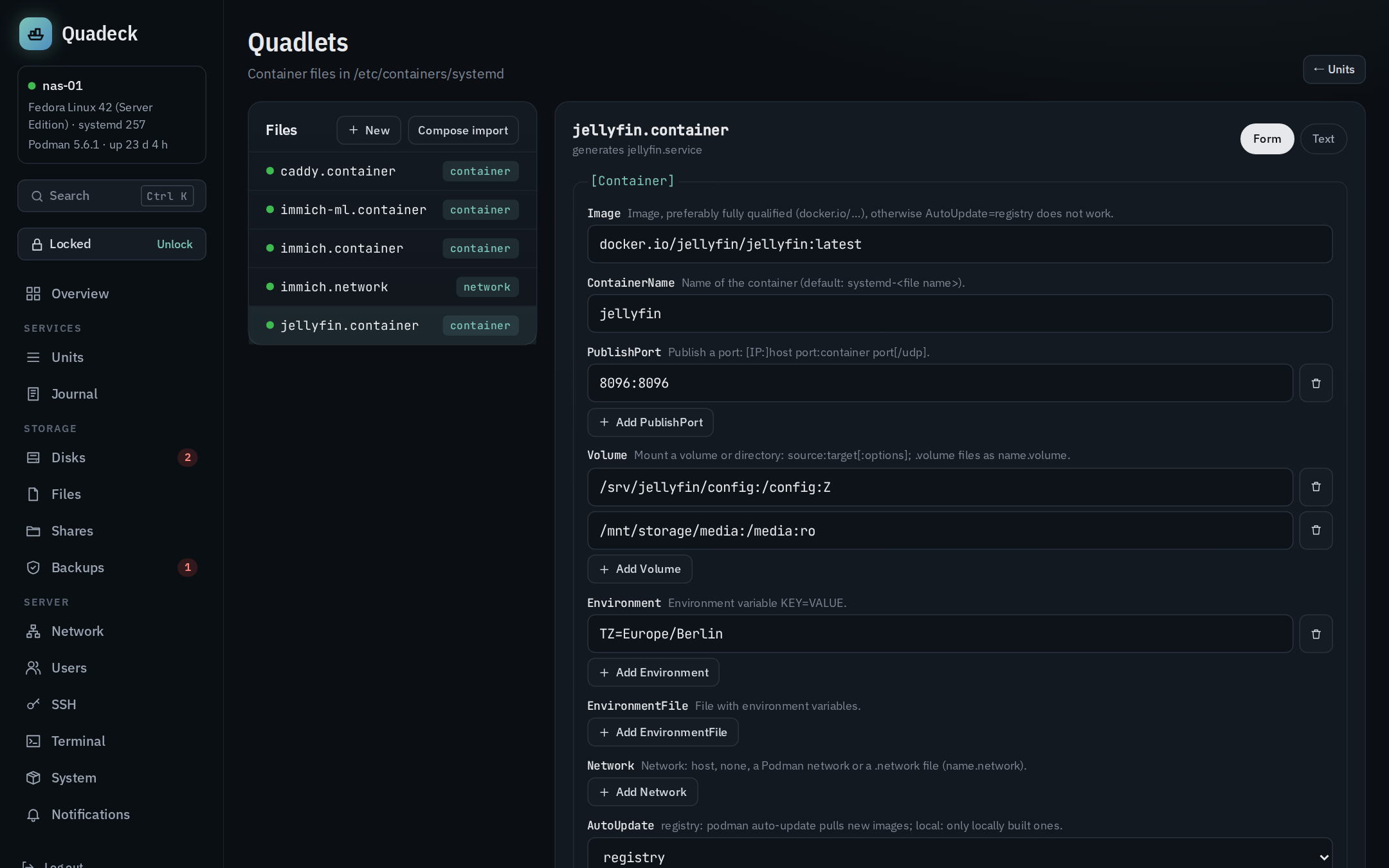
Form and text, same file
The form shows the keys that matter with a short explanation: image, container name, published
ports, volumes, environment and environment files, network, auto-update, labels, exec, user,
healthcheck, pod, devices, timezone, and the [Unit], [Service] and [Install] keys that
usually need touching (description, after, requires, restart, start timeout, wanted by).
The form edits the file line by line: changing a field changes only that Key= line, comments,
the order of lines and keys the form does not know stay exactly as they were. Keys that can appear
several times (ports, volumes, environment, labels) are lists in the form. Text shows the whole
file with line numbers; both views work on the same content.
Validation
Check (and automatically before saving) runs two checks:
- Quadeck's own lint with line numbers: unknown keys for the file type, duplicate single-value
keys, a
.containerwithoutImage=, references to.network,.volumeor.podfiles that do not exist. - A dry run of the real Quadlet generator (
quadlet -dryrunon a copy of the directory with the edited file). Its errors are mapped back to lines; the generated systemd unit can be shown.
Errors block saving, warnings do not.
Saving
Save … shows the diff against the file on disk, lets you choose whether the unit is
restarted afterwards, and writes through the root helper: atomic write, systemctl daemon-reload,
optionally RestartUnit. If the restart fails, the file stays saved and the error is shown with a
hint to the journal. If the file was changed on disk since the editor loaded it (another tab, a
package update, an edit on the shell), the save is refused instead of overwriting it; a new file
is never saved over an existing one of the same name. Saving needs the unlock.
History
Every save is committed to a git repository that Quadeck keeps under
/var/lib/quadeck-helper/quadlets.git (the Quadlet directory itself stays clean, no .git in
/etc). History lists the versions, shows the diff of a version against the editor content
and can load it back into the editor. Without git on the host, everything except the history
works.
New files and templates
New creates a file from a template: web service with a published port, PostgreSQL database,
empty container, network, volume, pod. The name becomes the file name and the generated unit name
(name.container → name.service, name.network → name-network.service).
Compose import
Compose import turns a docker-compose.yml into Quadlet files: every service becomes a
.container, named volumes become .volume files, and one .network per project connects
them. Image, ports, volumes, environment, env files, command and entrypoint, user, working
directory, hostname, restart policy, devices, privileged, added capabilities, healthcheck,
labels, networks and dependencies are translated. Everything the importer cannot express (build
sections, deploy options, unknown keys) is listed as a warning above the preview instead of
disappearing silently. Convert shows the files first; Create N files writes them all
(networks and volumes first, existing files are marked "will be overwritten") and, if chosen,
starts the units.
Deleting
Delete in the editor, or Delete Quadlet … in the unit's row menu, stops the unit, deletes
the file, commits the deletion to the history (the file can be restored from there) and reloads
systemd, so the generated service is gone and does not come back at the next boot. Stopping alone
is Stop … in the row menu; a Quadlet unit then starts again at the next boot if its file has
an [Install] section – switch Autostart off to keep it off.
For a .container the dialog offers two more boxes, both off by default:
- Also remove the image:
podman rmiafter the container is gone. Not offered when another Quadlet uses the same image; if Podman still refuses (another container outside the Quadlets uses it), the file is deleted anyway and a warning names the image. - Also delete the volumes: the named volumes of
Volume=lines, withpodman volume rm. A volume from a.volumefile is removed together with that file. Volumes another Quadlet mounts too are listed as kept. The data is gone afterwards; the history only keeps the files.
Folders on the host (Volume=/srv/app:/config) are never deleted; the dialog lists them so you
know what is left. .network files and other Quadlets the container referred to stay as well.
Podman settings
The Podman tab on the System page (next to the container image updates):
podman-auto-update.timer: on/off and schedule. Custom schedules are written as a drop-in/etc/systemd/system/podman-auto-update.timer.d/50-quadeck.confaftersystemd-analyze calendaraccepted them; the vendor timer file stays untouched.- Auto-update for all containers (Podman 5 and newer): a Quadlet drop-in
container.d/50-quadeck-autoupdate.confwithAutoUpdate=registry, so every.containerfile takes part inpodman auto-updatewithout editing each one. containers.confandregistries.conf: a form for the common settings plus a text editor. The file is parsed as TOML before it is written; the previous version is kept next to it as.quadeck-bak.storage.confis shown read-only: changes there can make existing containers unusable.
Secrets
Passwords and tokens for containers belong in Podman, not in the Quadlet file (which is readable, versioned in the editor's history and easily copied). The Secrets card on the same tab:
- lists Podman's secrets with the Quadlet files that use them (
Secret=lines) and when they were last changed – never their values; Podman does not show them again either; - New secret …: a name and the value (a password field). The value is only handed to Podman's API in the request body – never on a command line, never logged;
- Replace … swaps the value (Podman 4.7 or newer); the container sees it after a restart;
- Delete only for secrets no Quadlet file names, so no container loses its password;
- Passwords in plain text:
Environment=assignments in.containerfiles whose name ends in PASSWORD, PASSWD, PASS, SECRET, TOKEN, API_KEY, PRIVATE_KEY or CREDENTIALS (not*_FILE, not${VAR}) are listed – with the key, never the value – and the Quadlet editor warns on such lines. Move to a secret … creates the secret with that value and rewrites the line:Environment=DB_USERNAME=immich DB_PASSWORD=…becomesEnvironment=DB_USERNAME=immichplusSecret=immich-db-password,type=env,target=DB_PASSWORD, so the container gets the same variable as before; every other line stays as it was. Optionally the container is restarted. If the file cannot be saved, the secret is removed again. The previous version with the password stays in the editor's history.
In a Quadlet file a secret is used as an environment variable (Secret=name,type=env,target=VAR)
or as a file (Secret=name → /run/secrets/name); Secret is in the editor's form too.
Storage & cleanup
What Podman keeps on disk and what uses it, on the same tab:
- Overview: images, volumes and containers with their size and what could be freed, where
Podman stores them (
graphRoot) and how full that disk is. Read from the Podman API (system/df, which measures every volume – on a large server that takes a moment). - Images: name, size (only what this image holds alone, shared layers excluded), age and
used by – containers, or the Quadlet whose
Image=names it (also while that service is stopped). Untagged images are shown as old version of …: what an update leaves behind. - Volumes: size, created, used by, the Quadlet
.volumefile that creates it, the folder on disk. Volumes no container uses come first. - Stopped containers: state, exit code, since when. Containers of a Quadlet or a pod are not removed here – their unit or pod decides.
- Delete next to anything nobody uses; volumes ask first, they hold data.
Clean up … opens a dialog with a live preview of exactly what goes and how much it frees:
- Safe (on by default): stopped containers without a Quadlet or pod, old image versions
(untagged), networks without containers (never the default network, never one from a
.networkfile). - More thorough (off): all images no container and no Quadlet uses; they are pulled again when needed.
- Volumes without a container (off, in a red box): picked one by one.
Images, volumes and networks that only the removed containers used are freed with them. Right before deleting, Quadeck reads everything again and drops whatever is in use by now; every item is deleted on its own through the Podman API without force, so Podman itself refuses anything in use. The result lists what was freed and what was not, with Podman's reason. Needs unlocking; off in read-only mode.
Clean up regularly creates the timer quadeck-podman-prune.timer (weekly on Sunday or
monthly on the 1st, 04:00, persistent, low priority): podman container prune for stopped
containers without a PODMAN_SYSTEMD_UNIT label and podman image prune for untagged images,
both only older than a week. It never touches volumes, tagged images or networks. The timer also
shows under Units → Timers with its journal.