Automation
What SnapRAID UI can do around the jobs, all off by default: pause Docker containers while SnapRAID reads the disks, spin disks down once they have been idle for a while, and hand the jobs of an array to snapraid-daemon. Set them up under Automation in the sidebar.
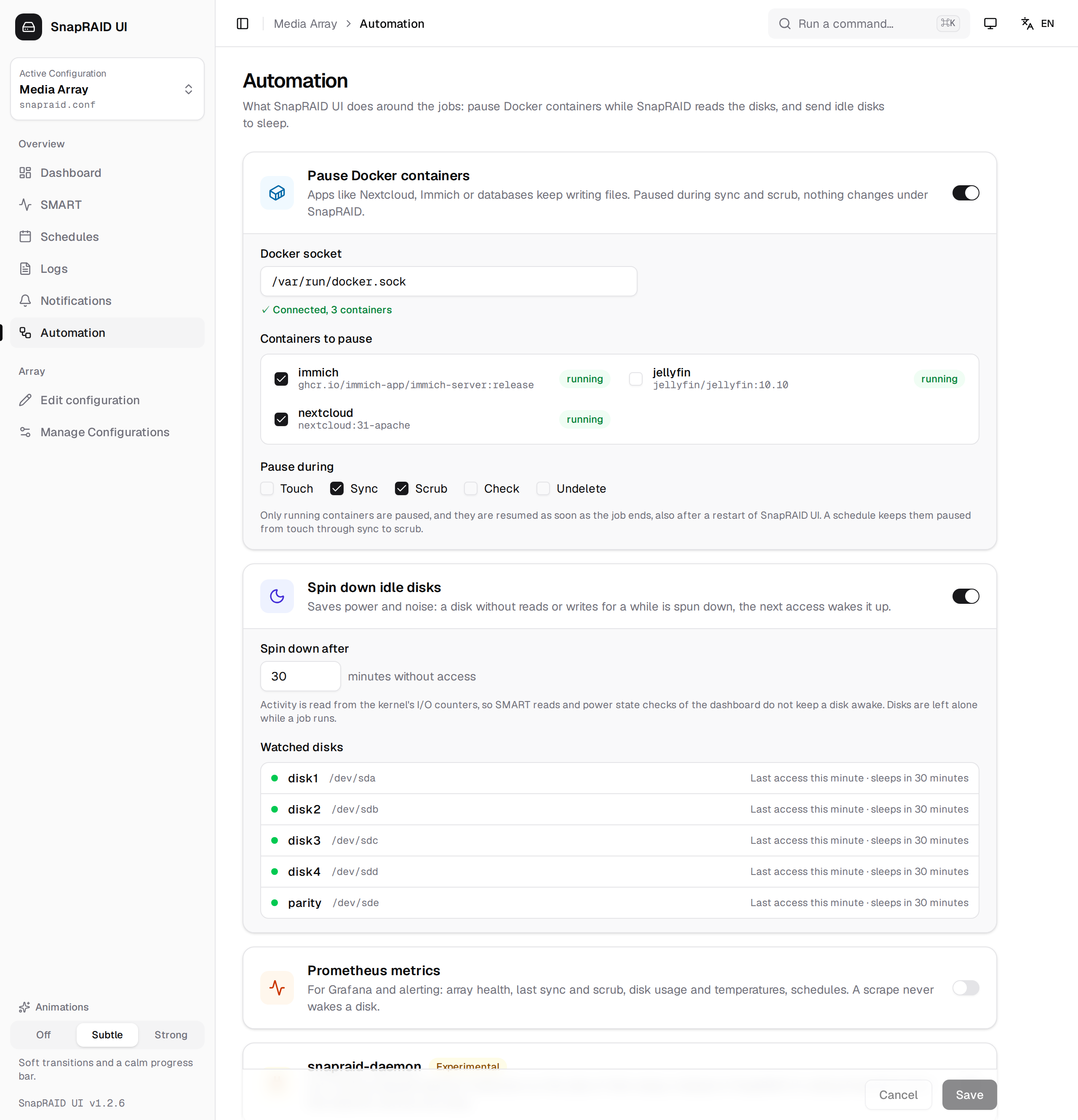
Changes take effect when you click Save. The settings are stored in maintenance.json in the data folder and are part of the settings backup.
Pause Docker containers
Apps like Nextcloud, Immich, photo libraries or databases keep writing files on the data disks. A file that changes while sync reads it gets parity that does not match, and scrub reports it as an error. Pausing those containers for the duration of the job keeps their files still.
| Field | Default | Description |
|---|---|---|
| Docker socket | /var/run/docker.sock |
The Docker API socket, mounted into the container. The line below it shows whether it can be reached and how many containers it reports. |
| Containers to pause | none | The containers on that socket. SnapRAID UI's own container is listed but can't be picked: paused, it could not resume the others. A container picked earlier that no longer exists is shown as not found. |
| Pause during | Sync, Scrub | The jobs to pause them for: Touch, Sync, Scrub, Check, Undelete. |
How it works:
- Before the job starts, every picked container that is running is paused (
docker pause). Containers that are stopped or already paused are left alone, and are not resumed afterwards. - When the job ends, successful or not, the containers paused for it are resumed in reverse order.
- A schedule with the nightly routine keeps them paused from
touchthroughsynctoscrub, instead of resuming them between the steps. - The job output shows which containers were paused and resumed, and any container that could not be paused. A container that fails to pause does not stop the job.
- If SnapRAID UI is restarted while containers are paused, it resumes them on the next start.
docker pause freezes the processes, it does not stop them. Connections stay open and the apps continue where they were. Clients of a paused app wait for the job; schedule long syncs and scrubs for the night.
[!WARNING] Access to the Docker socket is access to the host: whoever can use it can start privileged containers. Only mount it if you need this feature, and protect the UI with a login.
Spin down idle disks
A disk without reads or writes for the set time is spun down with snapraid down, which uses smartctl -s standby,now. The next access wakes it up again.
| Field | Default | Description |
|---|---|---|
| Spin down after | 30 | Minutes without access, 5 to 1440. |
How it works:
- Once a minute SnapRAID UI reads the kernel's I/O counters (
/proc/diskstats) for every disk of the enabled configurations; which device belongs to which disk comes fromsnapraid devices. - It watches the counters of the disk's partition. SMART reads and the power state checks of the dashboard only count as I/O of the whole disk, so they do not keep a disk awake.
- A disk that has been spun down is not sent to sleep again until it was active in between.
- While a job runs, and in the two minutes before a schedule starts, nothing is spun down:
snapraid downholds SnapRAID's lock for a moment, a job starting meanwhile would fail.
Watched disks lists the disks with their device, their last access and when they will be spun down, or Spun down … for sleeping ones. If no disks show up, SnapRAID can't see the devices; in Docker the container has to be privileged.
[!NOTE] If the host already spins disks down, for example with
hdparm -Sorhd-idle, leave this off or use the same idle time. Frequent spin-ups wear disks more than running; very short idle times are not worth it for disks that are used every few minutes.
Prometheus metrics
Exposes the state of the arrays for Prometheus at /api/metrics, for Grafana dashboards and alerts. The values come from what SnapRAID UI already knows; a scrape runs neither SnapRAID nor smartctl, so it never wakes a disk.
| Field | Default | Description |
|---|---|---|
| Access token | generated | Prometheus sends it as bearer token (Authorization: Bearer <token>). New token replaces it. Leave it empty only on a network you trust. |
The page shows a ready scrape_configs entry for prometheus.yml. The login of the UI does not apply to /api/metrics, the token does; without it the endpoint answers 401, and 404 while the metrics are switched off.
| Metric | Labels | Value |
|---|---|---|
snapraid_ui_up |
Always 1 | |
snapraid_job_running, snapraid_job_info |
command, config |
1 while a job runs, and which |
snapraid_last_sync_timestamp_seconds, snapraid_last_scrub_timestamp_seconds |
config |
End of the last sync or scrub, from the logs |
snapraid_last_sync_success, snapraid_last_scrub_success |
config |
1 when it succeeded (also with warnings) |
snapraid_bad_blocks |
config |
Blocks marked bad, repaired by Repair and verify |
snapraid_sync_incomplete |
config |
1 when the last sync did not finish |
snapraid_scrubbed_ratio, snapraid_oldest_scrub_days |
config |
Share of the array scrubbed, age of the oldest scrub |
snapraid_disks_unavailable |
config |
Disks missing or empty, probably not mounted |
snapraid_status_timestamp_seconds |
config |
When the values above were read |
snapraid_disk_used_bytes, snapraid_disk_free_bytes |
config, disk |
Space at the last status read |
snapraid_disk_temperature_celsius, snapraid_disk_reallocated_sectors, snapraid_disk_pending_sectors, snapraid_disk_crc_errors |
config, disk |
From the last SMART read |
snapraid_schedule_enabled, snapraid_schedule_next_run_timestamp_seconds, snapraid_schedule_last_run_timestamp_seconds |
schedule, command |
Per schedule |
snapraid_schedule_last_success, snapraid_schedule_last_skipped |
schedule, command |
Result of its last run |
The status values (bad blocks to snapraid_disks_unavailable) come from the last time the dashboard or a schedule read the status; after a restart of SnapRAID UI they return with the next read. Values SMART did not report are left out rather than reported as 0.
Example alert rules:
- alert: SnapraidSyncOverdue
  expr: time() - snapraid_last_sync_timestamp_seconds > 2 * 86400
- alert: SnapraidBadBlocks
  expr: snapraid_bad_blocks > 0
- alert: SnapraidDiskHot
  expr: snapraid_disk_temperature_celsius >= 50
snapraid-daemon (experimental)
snapraid-daemon is the SnapRAID author's own background service with a REST API. If you run it already, SnapRAID UI can hand the jobs of an array to it instead of calling SnapRAID itself. Turn it on with snapraid-daemon on the Automation page.
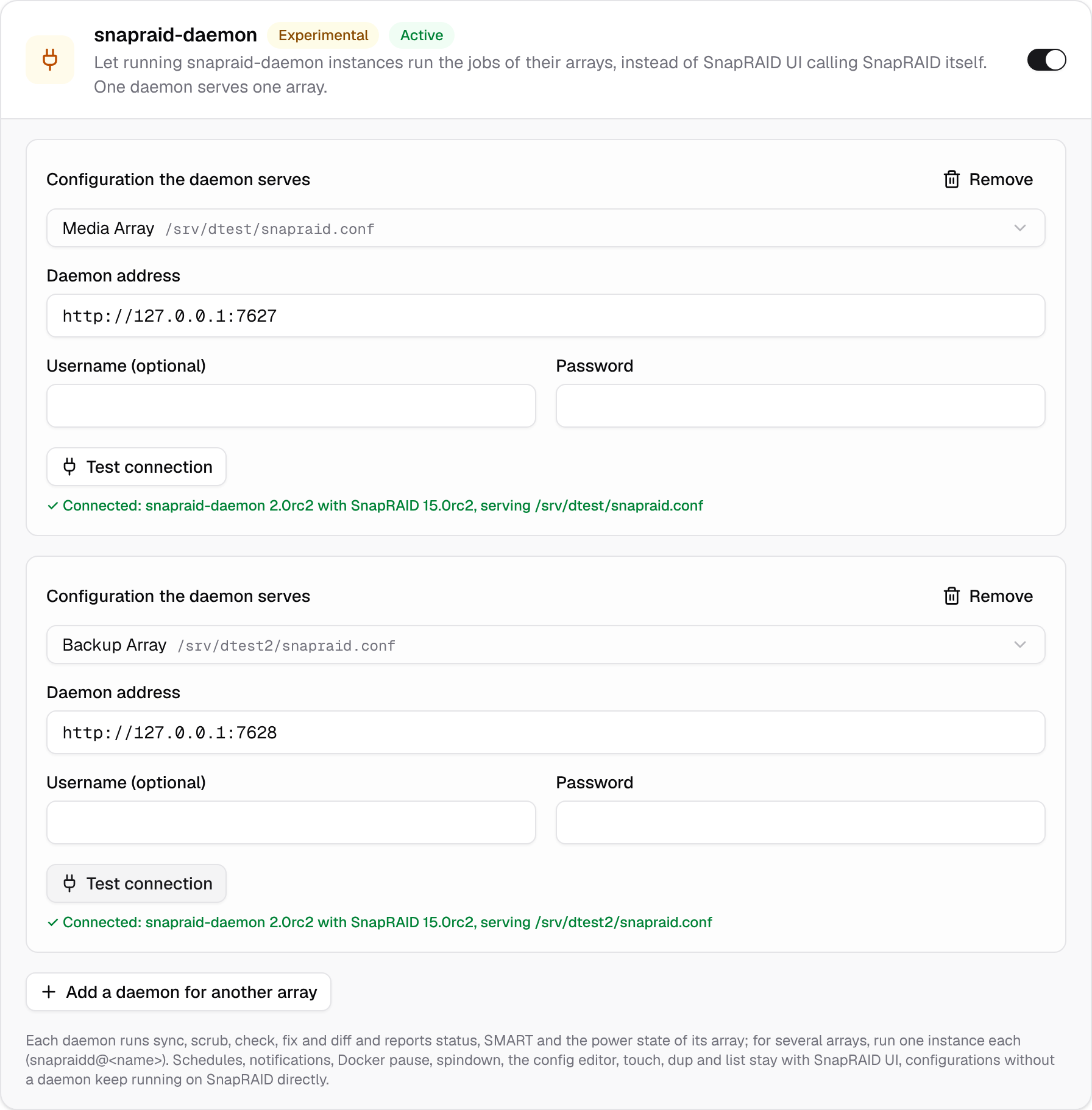
A daemon serves exactly one array. For several arrays run one instance per array, as the daemon intends it: with systemd through its template unit, e.g. systemctl enable --now snapraidd@media snapraidd@backup, each with its own snapraidd-<name>.conf, snapraid-<name>.conf and port (net_port). In SnapRAID UI add one entry per daemon:
| Field | Description |
|---|---|
| Configuration the daemon serves | The SnapRAID UI configuration of the array; each configuration can have one daemon. |
| Daemon address | e.g. http://127.0.0.1:7627, the net_port of that instance. |
| Username, Password | Only if the daemon has net_auth_credential set. The password is stored in engine.json (file mode 600) and never sent back to the browser. |
Test connection shows the daemon and SnapRAID version and the snapraid.conf the daemon serves, and warns when the daemon would do something on its own that SnapRAID UI also does.
Set up the daemon for it
SnapRAID UI keeps the schedules, the notifications, the Docker pause and the spindown. Turn them off in the daemon, or both would run:
# snapraidd-<name>.conf
maintenance_schedule =
spindown_idle_minutes = 0
hook_docker_pause =
notify_result =
notify_start =
What runs where
| On the daemon | In SnapRAID UI | |
|---|---|---|
| sync, scrub, check, fix, diff, SMART, power state, status of the array | ✓ | |
| touch (the daemon has no touch job), dup, list, the config editor and the disk wizards | ✓, through the SnapRAID CLI | |
| Schedules, notifications, Docker pause, spindown | ✓ | |
| Configurations without a daemon | ✓, through the SnapRAID CLI |
As before, one job runs at a time across all arrays.
Limitations
- snapraid-daemon 2.0 and SnapRAID 15 are release candidates. The daemon mode was tested with snapraid-daemon 2.0rc2 and SnapRAID 15.0rc2.
- The daemon does not count files per disk, the Files column of the disks table shows "–".
- Last sync and Last scrub come from the daemon's task history. Its logs are the daemon's, so there is no Log link and its runs don't show on the Logs page.
- The daemon reports SMART attributes by name. SnapRAID UI maps the common ones (reallocated, pending and uncorrectable sectors, CRC errors, …) to their ids for its assessment; other attributes are shown without an id.
- touch, dup and list call SnapRAID directly, so SnapRAID UI needs the disks mounted, and should have the same SnapRAID version as the daemon. touch runs as a job, one at a time as usual. Jobs the daemon starts by itself, e.g. from its own web UI, are not seen by SnapRAID UI.