Development
Everything you need to work on the app: setup, scripts, project layout, conventions, translations, adding a device and debugging on a phone.
Contents
- Requirements
- Setup
- Scripts
- Project structure
- Conventions
- Translations
- UI components
- Adding a setting or feature
- Adding a device
- Working without a device
- Debugging on Android
- Updating screenshots
- App icons
- Social preview
Requirements
- Node.js 22 or newer and npm.
- Chrome or Edge for Web Bluetooth (see Getting started), plus a compatible device for real-world testing. Most work can be done against the Bluetooth mock.
- Optional: Docker, to test the production image.
Setup
git clone https://github.com/firsttris/reactive-volcano-app.git
cd reactive-volcano-app
npm install
npm run dev
The dev server listens on all interfaces (vite --host) at port 5173. http://localhost:5173 is a
secure context, so Web Bluetooth works there. For another device on your network see
Debugging on Android.
Scripts
| Script | What it does |
|---|---|
npm run dev |
Vite dev server with hot reload |
npm run build |
type check + production build for GitHub Pages (base /reactive-volcano-app/) into dist/ |
npm run build:root |
the same with base / (Docker, own domain) |
npm run preview |
serves dist/ locally |
npm run typecheck |
compiles the messages, then tsc --noEmit |
npm run lint / lint:fix |
Biome: lint, format and import order |
npm test |
unit tests (Vitest) |
npm run test:watch / test:ui / test:coverage |
Vitest in watch mode, with UI, with coverage |
npm run test:e2e |
end-to-end tests (Playwright, starts the dev server) |
npm run test:e2e:ui / test:e2e:debug / test:e2e:report |
Playwright UI mode, debugger, last report |
npm run screenshots |
renders the images in docs/ (below) |
npm run icons |
renders the app icons in public/ from scripts/icons/icon.svg (below) |
npm run social-preview |
renders docs/social-preview.png (below) |
npm run i18n |
compiles messages/*.json into src/paraglide |
npm run release:patch / minor / major |
bumps the version, tags and pushes (Releases) |
Before a pull request: npm run typecheck && npm run lint && npm test && npm run test:e2e.
The documentation website (MkDocs Material, mkdocs.yml)
is built with Python:
pip install -r requirements-docs.txt
mkdocs serve            # http://127.0.0.1:8000/ with live reload
mkdocs build --strict   # what CI runs: fails on a broken link or anchor
Project structure
src/
  index.tsx                 entry: app-wide providers, mounts the router
  Router.tsx                route tree
  routes.ts                 route constants (ROUTES) and typed builders (buildRoute)
  Views/                    one view per device screen (control, settings)
  components/               shared and device-specific components
    ui/                     solid-ui primitives (button, card, switch, slider …)
    volcano/ crafty/ veazy-venty/
    TemperatureGauge.tsx …  shared device widgets
  provider/                 context providers: Bluetooth, per device, workflows, theme, toasts
  devices/
    shared/                 characteristic device core, debounced writer, analysis types
    volcano/ crafty/ ventyVeazy/
      protocol.ts           pure parse / encode / analysis   (+ protocol.test.ts)
      driver.ts             GATT access                      (+ driver.test.ts)
      store.ts              reactive state and actions
  hooks/                    workflows, IndexedDB, wake lock
  utils/                    UUIDs, Bluetooth queue, heat progress, workflow data
  css/main.css              Tailwind entry and design tokens (light / dark)
  paraglide/                generated messages (git-ignored)
messages/en.json, de.json   translations
project.inlang/             Paraglide project settings
tests/                      cross-cutting tests (translations)
e2e/                        Playwright tests and the Web Bluetooth mock
scripts/                    screenshot renderer
public/                     icons and static files
docs/                       this documentation and its images
  assets/, hooks/           theme and link hook of the documentation website (mkdocs.yml)
The layering behind devices/ is explained in Architecture.
Conventions
- TypeScript strict, no
anyin new code. Device values are typed end to end, from the protocol parser to the store. - Biome formats and lints (2 spaces, double quotes, semicolons, trailing commas
es5, 80 columns, sorted imports, Solid rules). Runnpm run lint:fixbefore committing. - Protocol code stays pure: no Web Bluetooth, no Solid, no timers in
protocol.ts. Everything there gets a unit test with byte fixtures. - All GATT calls go through the queue that is passed in. Never call
readValue/writeValuedirectly from a component. - Routes only through
ROUTESandbuildRoute. - UI text only through Paraglide messages, never hard-coded.
- Comments explain why (device quirks, protocol oddities), not what the next line does.
- Commits and pull requests: one topic per pull request, a short imperative title ("Add charge LED switch for Crafty"), description of what and why.
Translations
Texts live in messages/en.json and messages/de.json
(Paraglide JS, message format plugin).
- Keys follow
area_group_name, for examplesettings_permanentBoost,workflow_stepOf. - Placeholders use braces:
"workflow_stepOf": "Step {current}/{total}". - Plurals use the message format's
matchsyntax, seeworkflow_stepCount. - Components import
mand callm.settings_title(); the compiler creates one typed function per key. npm run i18ncompiles them tosrc/paraglide;dev,build,typecheckandtestdo that on their own.tests/i18n.test.tsfails when the two files have different keys or placeholders, or when a message is not used anywhere insrc/.
Adding a language: add messages/<locale>.json with all keys, add the locale to
project.inlang/settings.json, and run the tests.
UI components
- Primitives in
src/components/uicome from solid-ui (Kobalte underneath) and are owned by this repository; adapt them freely. - Styling with Tailwind utility classes and the tokens from
src/css/main.css(bg-card,text-muted-foreground,text-primary,bg-primary-soft…). Do not hard-code colors, so light and dark mode keep working. - Icons from
lucide-solid, imported per icon (lucide-solid/icons/thermometer) to keep the bundle small. - Settings screens are built from
SettingsSection,SettingSwitch,SettingSlider,SettingRowandInfoRowinsrc/components/Settings.tsx.
Adding a setting or feature
Typical path for a new device option, for example a new Venty / Veazy switch:
- Protocol: add the bit or field and an
encode…function inprotocol.ts; extend the parser. Add unit tests with real byte values. - Store: add the field to the state and an action that updates optimistically and calls the driver (debounced for numbers, immediate for switches).
- View: add a
SettingSwitch(or similar) in the settings view. - Messages: add label and description to
en.jsonandde.json. - Mock and e2e: if the value is visible on connect, add it to
e2e/helpers/bluetooth-mock.tsand cover it in the device's spec. - Docs: update Usage, the feature table in both READMEs and, if bytes changed, Bluetooth protocol.
Adding a device
- Protocol: capture the GATT layout and byte formats for the device and write
src/devices/<family>/protocol.tswith tests. Use only the device's own Bluetooth interface and information you are allowed to use; do not copy third-party code (see the legal notice). - UUIDs and detection: add services and characteristics to
src/utils/uuids.ts, aDeviceType, the advertised name or service togetDeviceFilters()anddetectDeviceType()inBluetoothProvider. - Driver: if the device has one characteristic per value, build on
createCharacteristicDevice; for command / response devices followventyVeazy/driver.ts. Exportconnect<Family>(server, queue). - Connection: add a driver signal and a
caseinconnectToDevice(). - Store and provider:
store.tswith state, actions, derived values; a provider that renders only while the driver exists. - Routes and views: constants in
routes.ts, a shell withDeviceShell, control and settings views, acaseinDeviceRouter. - Mock and tests: a device config in the Bluetooth mock and an e2e spec.
- Docs: README tables, Usage, Bluetooth protocol.
Working without a device
e2e/helpers/bluetooth-mock.ts replaces navigator.bluetooth with a simulated device (desktop,
Crafty, Venty or Veazy) including services, characteristics, reads, writes and notifications. It is
used by the end-to-end tests, and the easiest way to explore the UI without hardware is Playwright's UI
mode:
Pick a test, run it, then use the Pick locator and timeline views to inspect every step. See Testing.
Debugging on Android
Phones reach the dev server only over your LAN IP, which is not a secure context. Chrome can be told to treat it as one:
- Enable USB debugging on the phone and connect it to the computer.
- On the phone, open
chrome://flags/#unsafely-treat-insecure-origin-as-secure, addhttp://<your-computer-ip>:5173, enable it and restart Chrome.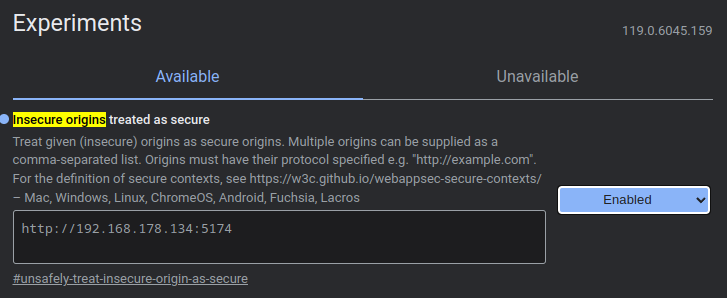
- Start
npm run devand openhttp://<your-computer-ip>:5173on the phone. - On the computer, open
chrome://inspect/#devicesand click inspect next to the tab. You get the full DevTools for the page on the phone, including the console with Bluetooth errors.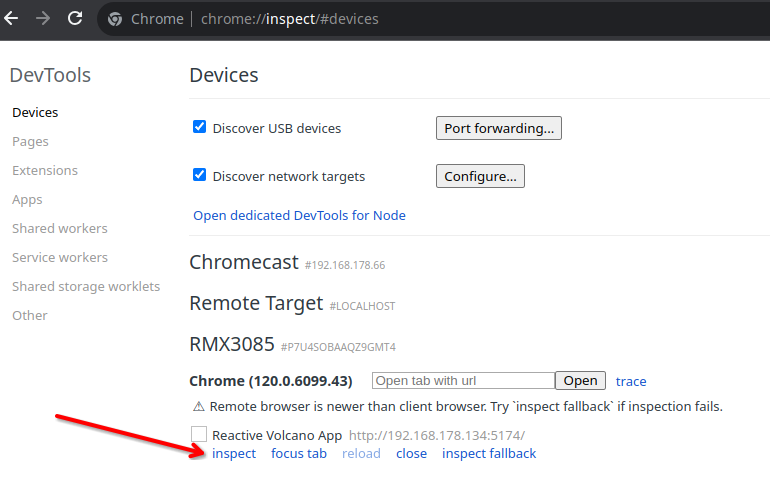
Alternatively use adb reverse tcp:5173 tcp:5173 and open http://localhost:5173 on the phone, which is
a secure context without any flag.
Updating screenshots
All images of the app in docs/ are rendered from the running app against the Bluetooth mock, in
English, dark mode, at phone size:
This runs scripts/screenshots.spec.ts with playwright.screenshots.config.ts (it starts the dev
server if none is running), writes docs/screenshot-*.png and composes docs/hero.png. If Playwright's
bundled browser is not installed, point it at a local Chromium:
CHROMIUM_PATH=/usr/bin/chromium npm run screenshots.
After a change to the look, run Update screenshots (Actions → Run workflow,
.github/workflows/screenshots.yml) on the branch: it takes the pictures and the social preview in
the official Playwright image and commits the ones that changed.
App icons
Every icon (favicon, PWA icons, maskable icon, Apple touch icon) is rendered from one source,
scripts/icons/icon.svg:
scripts/icons/generate.mjs writes public/pwa-192x192.png, pwa-512x512.png, the full-bleed
maskable-512x512.png and apple-touch-icon.png, favicon.ico (16, 32 and 48 px) and favicon.svg.
Keep the artwork inside the central circle (80 % of the width): Android crops maskable icons to a
circle or squircle. npm run screenshots also refreshes public/screenshots/, which Android shows in
the install dialog. Use CHROMIUM_PATH here as well if the bundled browser is missing.
Social preview
The image GitHub shows when the repository is shared (1280 × 640) is rendered from
scripts/social-preview/social-preview.html, with the icon and the screenshots from docs/:
It writes docs/social-preview.png. Upload it under Settings → General → Social preview; GitHub does
not read it from the repository. Render it again after npm run screenshots or a change to the icon.
CHROMIUM_PATH works here too.
Next: Testing · Architecture · Documentation index