Common setups
Step-by-step answers to the situations Keybund was built for. Each one shows what to click (or type) and what Keybund writes for it, so you can also see how it works underneath.
Two GitHub accounts on one computer
The problem. You have a private GitHub account and a work account (or one per client). GitHub
identifies you by the SSH key alone, and ssh offers the first key that GitHub accepts – often the
wrong one. Then git push fails with ERROR: Permission to org/repo.git denied to private-user,
or worse, it works with the wrong account.
With Keybund. One key per account, each with its own Git folder:
- New key “Private” → Git folder
~/dev/private/→ GitHub → Add key, paste it into your private account. - New key “Work” → Git folder
~/dev/work/→ GitHub → Add key, paste it into the work account. - Clone work repositories into
~/dev/work/, private ones into~/dev/private/. The remote URL stays the normalgit@github.com:org/repo.git.
What Keybund writes:
[includeIf "gitdir:~/dev/private/"]
    path = ~/.config/keybund/git/private.gitconfig

[includeIf "gitdir:~/dev/work/"]
    path = ~/.config/keybund/git/work.gitconfig
[user]
    email = you@company.com
[core]
    sshCommand = ssh -i ~/.ssh/work_ed25519 -o IdentitiesOnly=yes -o AddKeysToAgent=yes
Git includes work.gitconfig for every repository below ~/dev/work/, so git push there runs ssh
with exactly the work key (IdentitiesOnly=yes stops ssh from trying others).
And without folders? The alias way
If repositories of both accounts must live side by side, give the Git account an alias
instead (Git account → alias github-work). Keybund writes
Host github-work
    HostName github.com
    User git
    IdentityFile ~/.ssh/work_ed25519
    IdentitiesOnly yes
    AddKeysToAgent yes
and you use git@github-work:org/repo.git as the remote URL
(git remote set-url origin git@github-work:org/repo.git). Keybund never writes a block for plain
Host github.com – that would push one key into every connection to GitHub, including those of
your other keys.
A different Git e-mail per client
Commits in client repositories should carry the client's e-mail, everything else your own. On the
key's page, the first Git folder asks for Name in commits and E-mail in commits; later you
change them under Git identity. Empty fields mean “as in ~/.gitconfig”, so you can set only
the e-mail and keep your name.
Your global identity in ~/.gitconfig is never touched; Keybund only reads it to prefill the form
and to show which identity applies where. Check with git config user.email inside a repository, or
type the folder into the sidebar search.
A server, a NAS or a Raspberry Pi
New key “NAS” (or take your existing id_ed25519) → Server: hostname or IP 192.168.1.20,
alias nas, user admin, port if it is not 22 → Add key (asks the NAS's password once and
puts the key into ~/.ssh/authorized_keys there) → Test.
# Key: NAS
Host nas 192.168.1.20
    HostName 192.168.1.20
    User admin
    IdentityFile ~/.ssh/nas_ed25519
    IdentitiesOnly yes
    AddKeysToAgent yes
    UserKnownHostsFile ~/.ssh/known_hosts.d/nas ~/.ssh/known_hosts
    UpdateHostKeys yes
The block matches the alias and the IP, so ssh nas, ssh 192.168.1.20, scp file nas:,
rsync -a dir/ nas:backup/ and sftp://nas in Dolphin all use the NAS key. The NAS's host key goes
into its own file ~/.ssh/known_hosts.d/nas and leaves with the key when you archive it.
Dolphin does not find sftp://nas?
Dolphin reads the ssh configuration through libssh. Versions before 0.10.2 (e.g. Ubuntu 22.04)
do not understand ~ in Include. The doctor detects this and offers Include with the full
path.
A self-hosted GitLab (or Gitea, Forgejo)
Git account → provider GitLab, hostname gitlab.company.com (port if it is not 22). Combined with a
Git folder this works like GitHub above. Add key opens
https://gitlab.company.com/-/user_settings/ssh_keys. For Gitea, Forgejo or any other Git server,
add it as a Server (with its SSH user, usually git): Keybund writes a Host block for it, and
you add the public key in its web interface yourself (Copy public key copies it).
Signing commits with your SSH key
GitHub and GitLab show commits as Verified when they are signed with a key that is registered as a signing key in your account. On the key page, switch on Sign commits; it needs an e-mail in the key's Git identity. Keybund then adds to the key's gitconfig:
[user]
    signingkey = ~/.ssh/work_ed25519.pub
[gpg]
    format = ssh
[commit]
    gpgsign = true
[gpg "ssh"]
    allowedSignersFile = ~/.config/keybund/allowed_signers
and keeps ~/.config/keybund/allowed_signers up to date, so git log --show-signature can verify
your own commits locally. Add the same public key a second time in GitHub as Signing Key (GitHub
lists authentication and signing keys separately). Tags are signed on request (git tag -s), not
automatically.
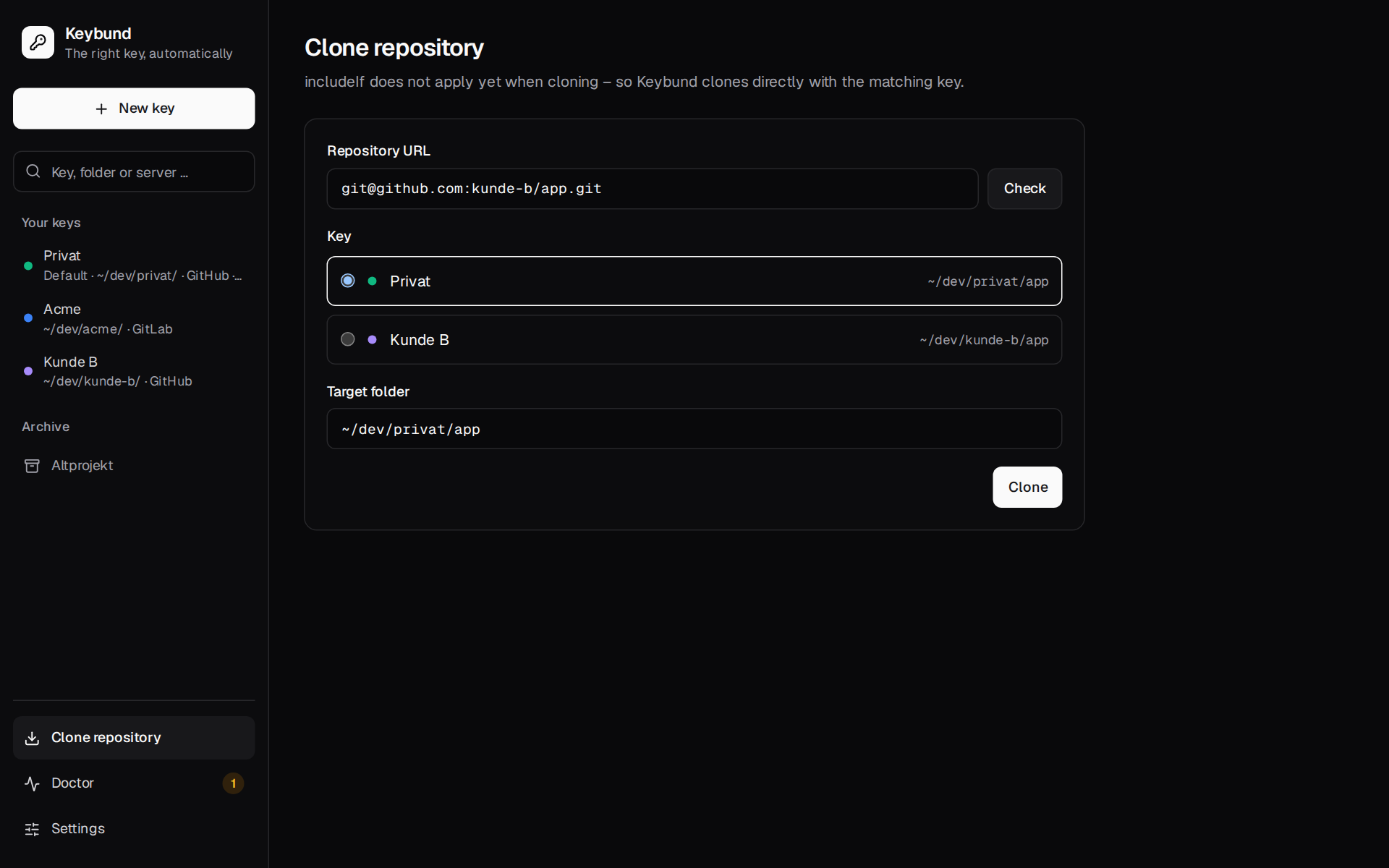
Cloning into the right folder with the right key
A plain git clone already takes the key of the folder it clones into: Git creates the new
repository and reads its config, the folder rule included, before it connects
(builtin/clone.c). So cd ~/dev/client-c && git clone git@github.com:client-c/app.git works.
Cloned anywhere else – ~/Downloads, say – it takes the default key and GitHub answers
“Repository not found”. Clone repository or
picks the key for the host (or asks if several keys fit), proposes ~/dev/client-c/app as the
target and runs git -c core.sshCommand="ssh -i … -o IdentitiesOnly=yes" clone -- <url> <target>.
The key is passed for this one command only; afterwards the folder rule takes over. Useful when you
are not sure which folder a repository belongs to.
When a client project ends
On the key's page, Archive moves the key pair to ~/.ssh/archive/, removes its Git
folders and Host blocks from the generated files and moves its known_hosts file along. The app (or
keybund archive client-c) then lists the pages where you should delete the key at GitHub, GitLab
or Bitbucket. Archived keys stay visible under Archive in the sidebar.
Using the CLI in scripts or dotfiles
Everything in the app is also a command. Commands that write show what they will change and ask
first, or take --yes; without a terminal (in a script) they refuse instead of asking.
keybund new --name "Client C" --provider github --folder ~/dev/client-c \
  --git-email tristan@client-c.com --yes
keybund test client-c && echo "GitHub knows the key"
keybund doctor || echo "something needs attention"
profiles.toml is plain TOML, so it can also live in your dotfiles; after copying it to a new
machine, keybund apply writes all configuration (the key files themselves have to be copied
separately – Keybund never touches private keys).