The app
The desktop app is the comfortable way to use Keybund: a sidebar with your keys, a page per key that answers “where is this key used?”, and tools for the rest. Every change is written immediately – there is no “apply” button to forget.
The app speaks English and German. It follows the language of your system (German for de_*,
English for everything else) and can be switched under Settings → Language at any time – without a
restart. Error messages, doctor checks and connection tests follow the chosen language too.
Layout
- Sidebar – New key, a search field, Your keys with a coloured dot and a one-line summary of where each is used, Archive and the tools at the bottom: Clone repository, Doctor (with the number of open hints) and Settings.
- Search – filters the keys as you type. Press Enter and it answers which key applies
here for a folder (
~/dev/acme/app) or a host (nas,github.com). - Status line – at the bottom of each page: Configs up to date with the time they were last written, or a yellow note if a generated file no longer matches – usually because it was edited or deleted by hand. Review & rewrite shows the diff and writes the files again.
Overview
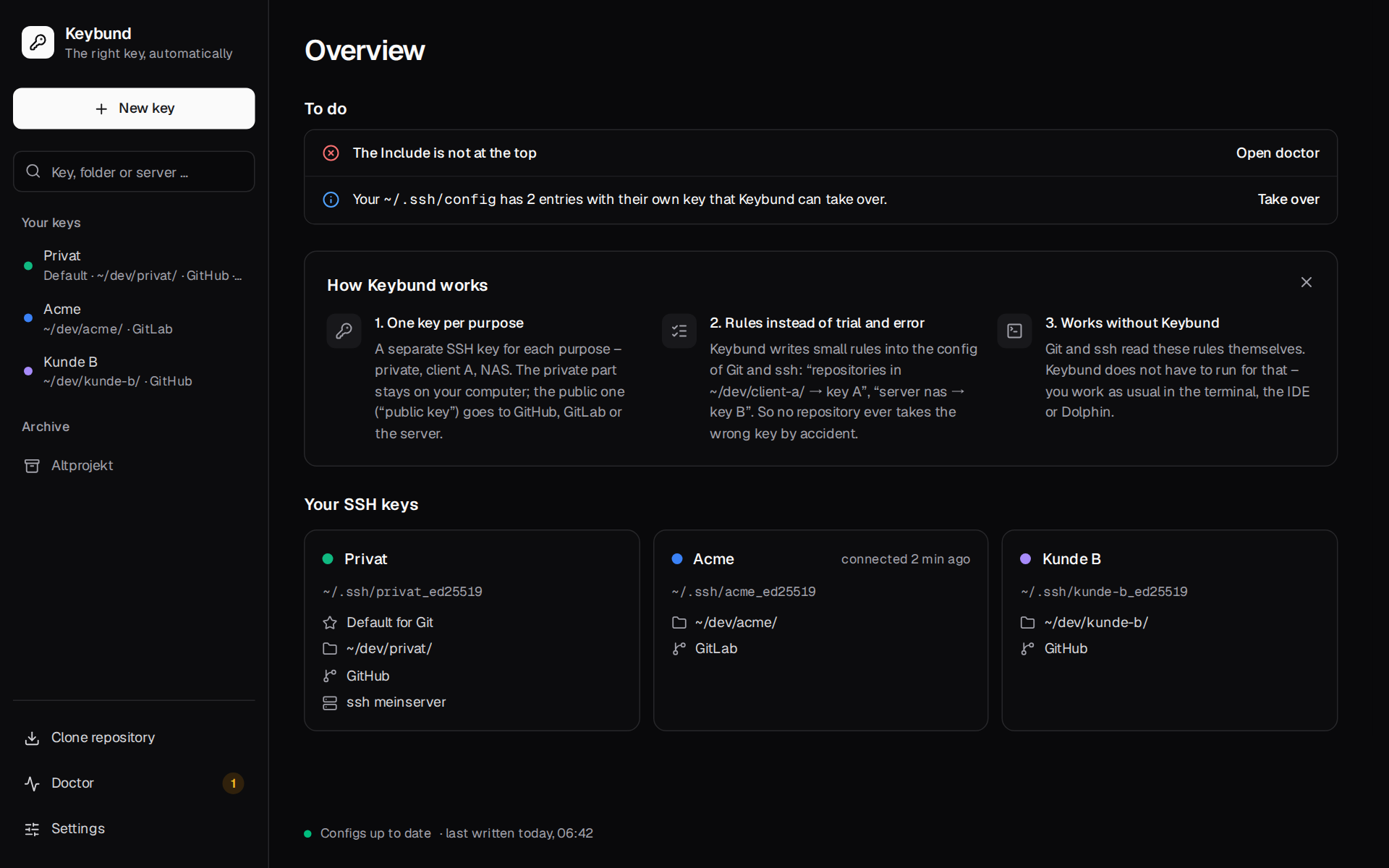
Overview shows
- To do: failed connection tests, hints from the doctor, keys that are not used anywhere yet, and
an offer to take over entries from your
~/.ssh/config– or “All fine”; - How Keybund works: three sentences for newcomers, can be closed;
- Your SSH keys: a card per key with its file, what it is used for and when it last connected successfully.
The key page
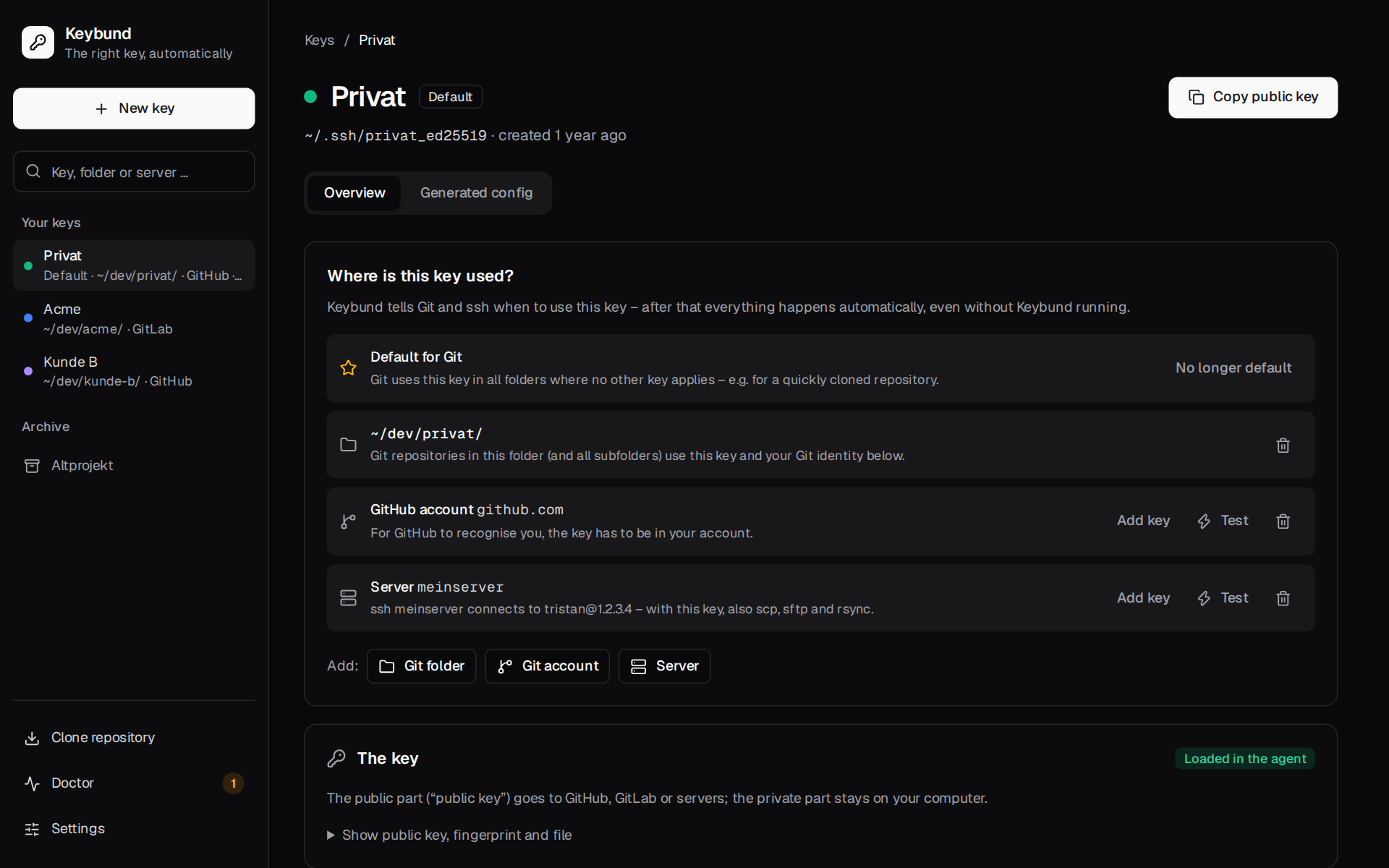
The header shows the key's name, Default if it is the default key, its file and age, and Copy public key.
Where is this key used?
One row per use, each with a short explanation in plain words:
| Row | Actions |
|---|---|
| Default for Git | No longer default |
Git folder, e.g. ~/dev/privat/ |
remove |
| GitHub / GitLab / Bitbucket account | Add key (copy the public key and open the provider's page), Test, remove |
Server, e.g. meinserver |
Add key (put the key into authorized_keys, like ssh-copy-id), Test, remove |
Add: Git folder, Git account, Server. A test result stays under its row until you close it with ×, like the hint after Add key – and on the next visit the row still says how its last test went (also a test from the command line). The sidebar and the overview sum it up per key: if any of its hosts failed, the key shows the failure. Details: what happened during the test explains each step of the ssh connection, shows the command to run it yourself and, on request, ssh's complete output.
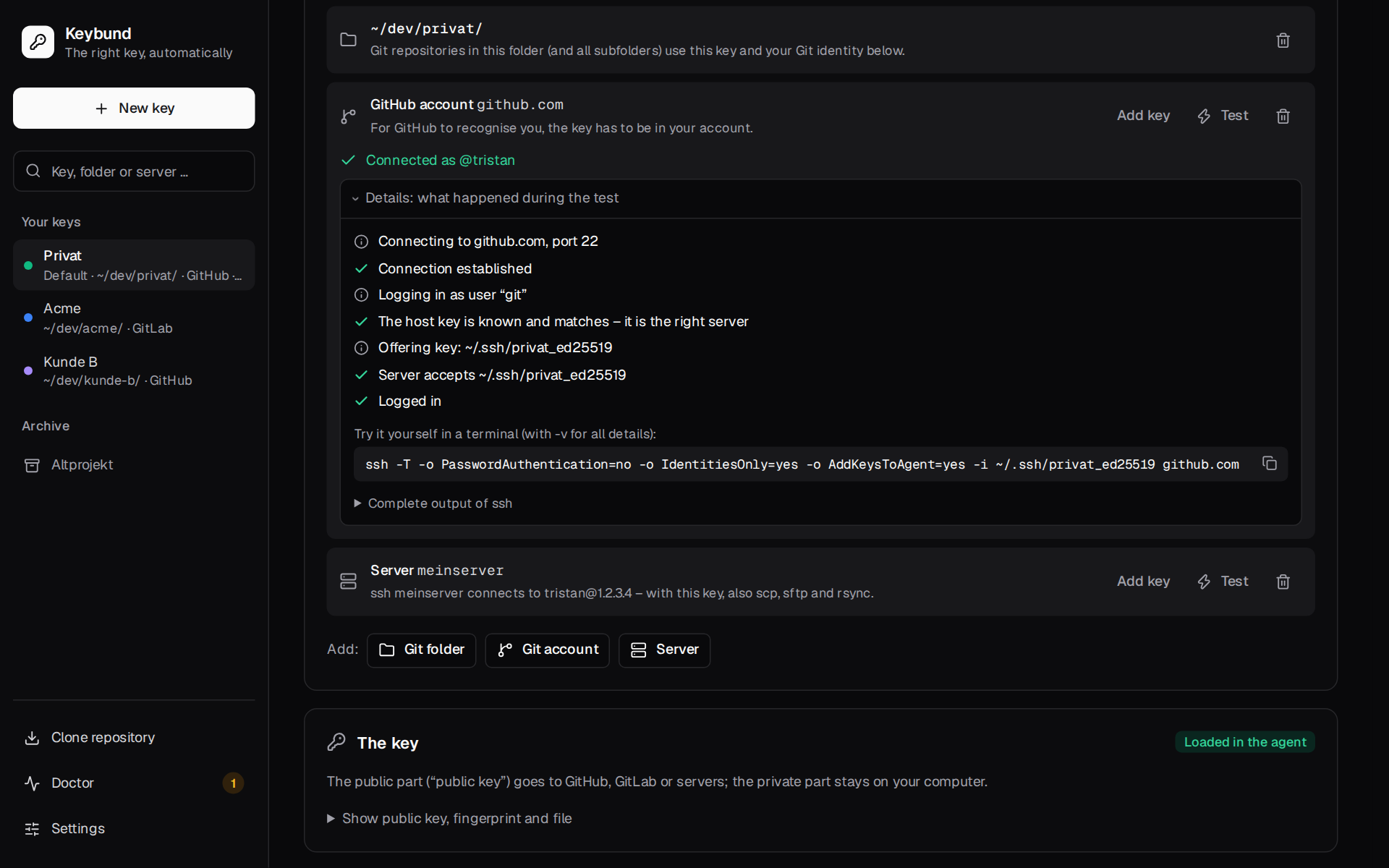
Before the first connection to a new server, a dialog shows its host key fingerprint; only after Fingerprint matches does ssh connect. When a test fails, the row offers the fix that fits: the button to add the key, or the hint that a different key was accepted (“Logged in, but with ~/.ssh/id_ed25519 instead of this key”).
The key
The public key, the fingerprint and the file, plus badges: Loaded in the agent (no passphrase prompt), Key file missing or Older than 2 years – rotate.
Git identity and signing
The name and e-mail for commits in this key's Git folders. Empty means “as in ~/.gitconfig”, and
the global identity is shown as a hint. Without a Git folder the card explains that the global
identity applies. Sign commits signs every commit in the key's folders with this SSH key – see
Signing commits.
Manage
Archive moves the key pair to ~/.ssh/archive/, removes everything Keybund wrote for it and lists
the pages where you should remove the key at the provider.
Generated config
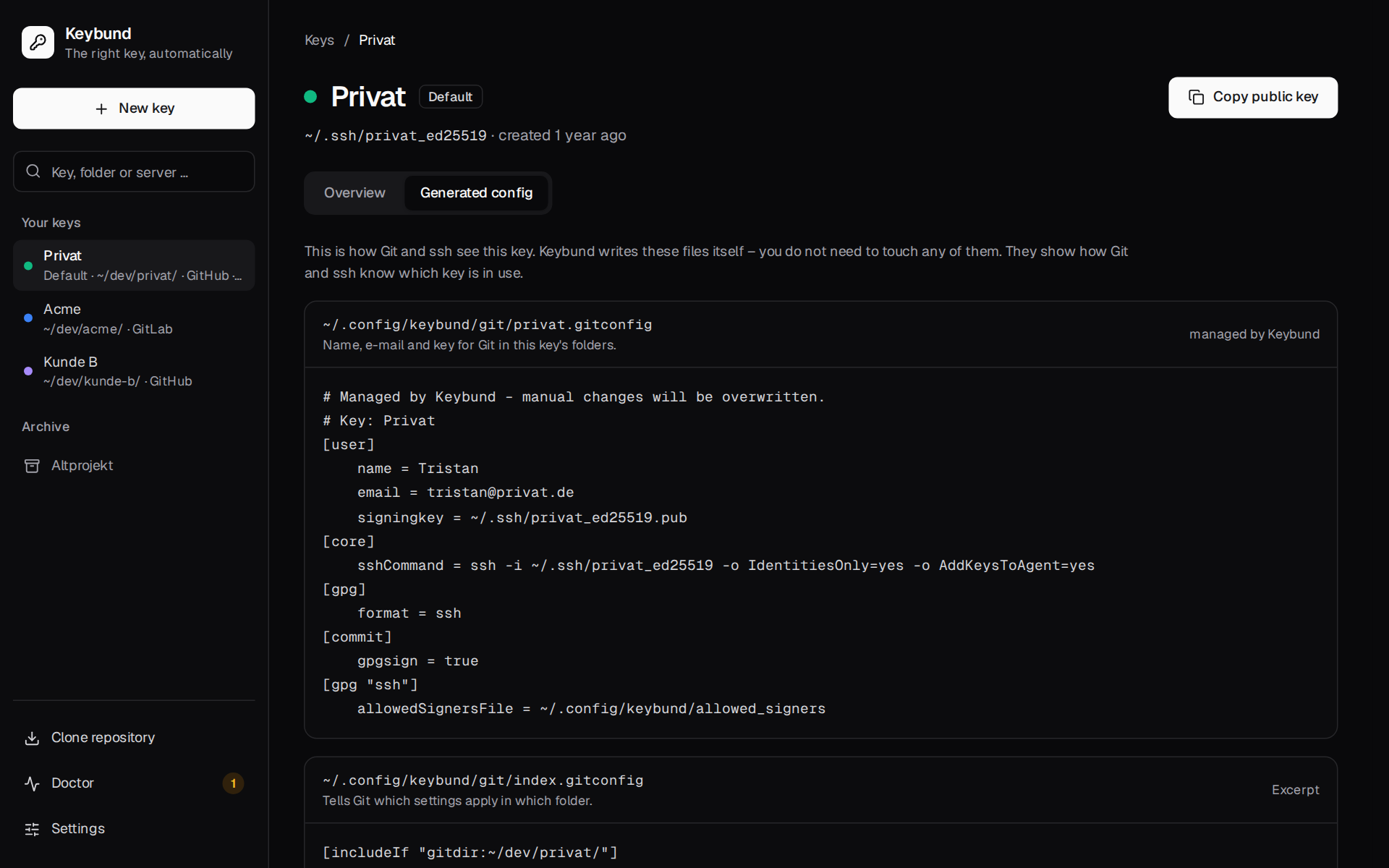
The second tab shows exactly what Keybund writes for this key: its gitconfig, its lines in
index.gitconfig, its Host blocks and the include lines in your own files – with a sentence on
what each file is for.
New key
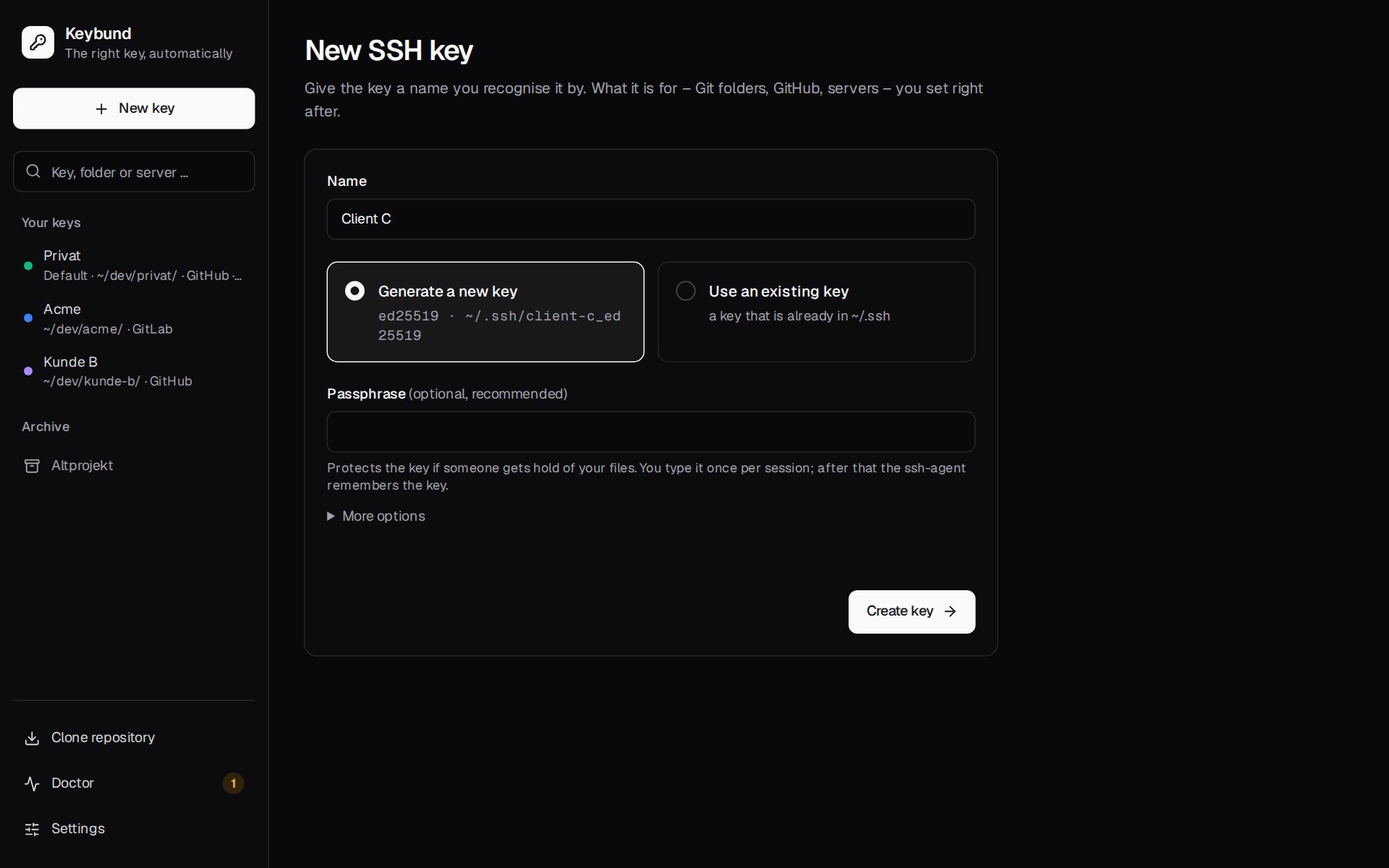
A single short form: Name, Generate a new key (Ed25519) or Use an existing key (from
~/.ssh), an optional Passphrase and, under More options, the comment. After Create key the
key page opens, where you say what the key is for.
Which key?
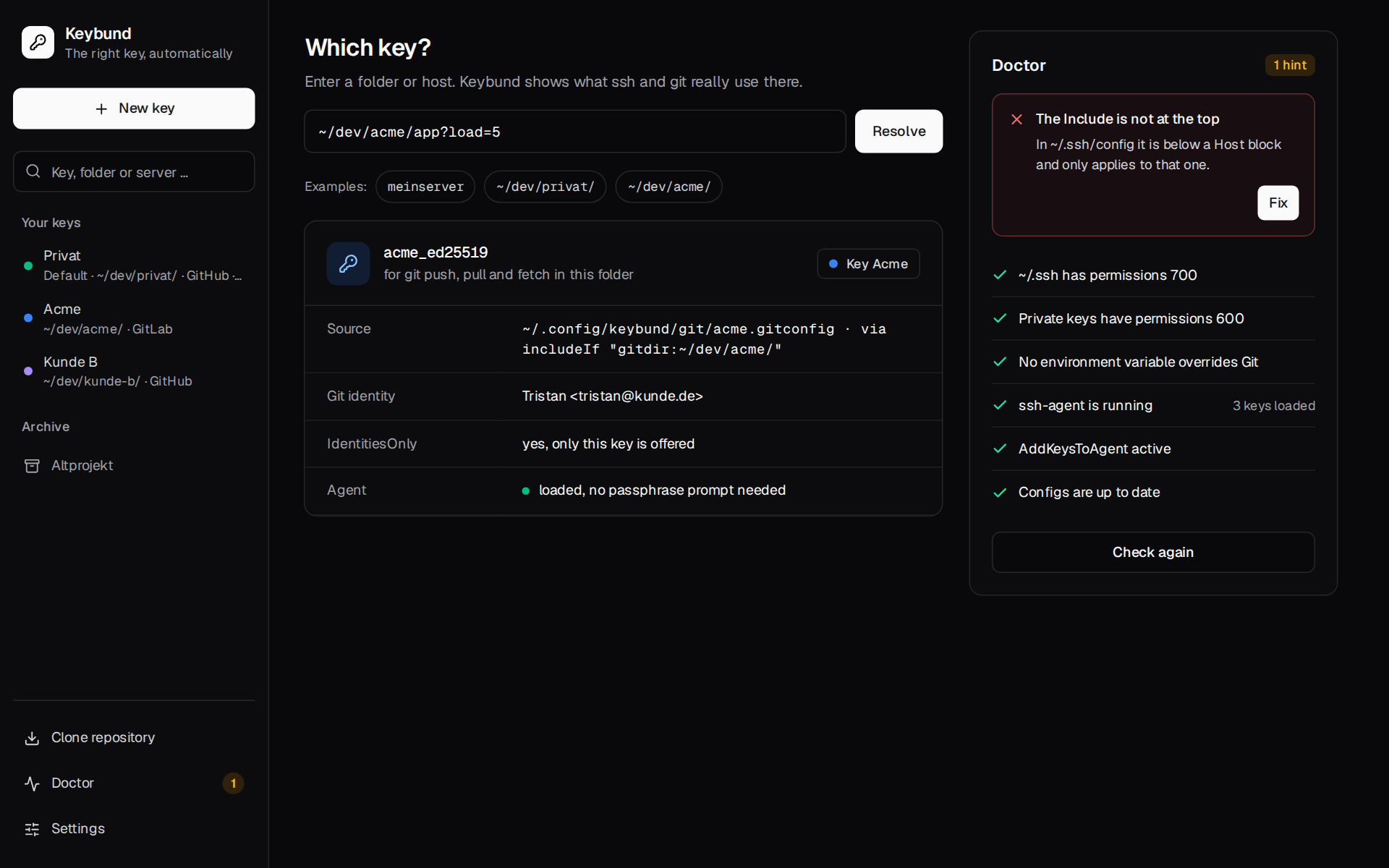
Type a folder or host and Keybund asks Git and ssh what they would actually use – not what Keybund thinks they should use:
- for a folder:
git config --show-origin core.sshCommand,user.nameanduser.emailinside it, and whichincludeIfbrought it in (also for linked worktrees); - for a host:
ssh -G <host>– the key,IdentitiesOnly, hostname, user and port; - for both: whether the key is loaded in the agent, and notes when something is off (a repository
with its own
core.sshCommandthat overrides the folder rule, a missing key file, no agent).
Doctor
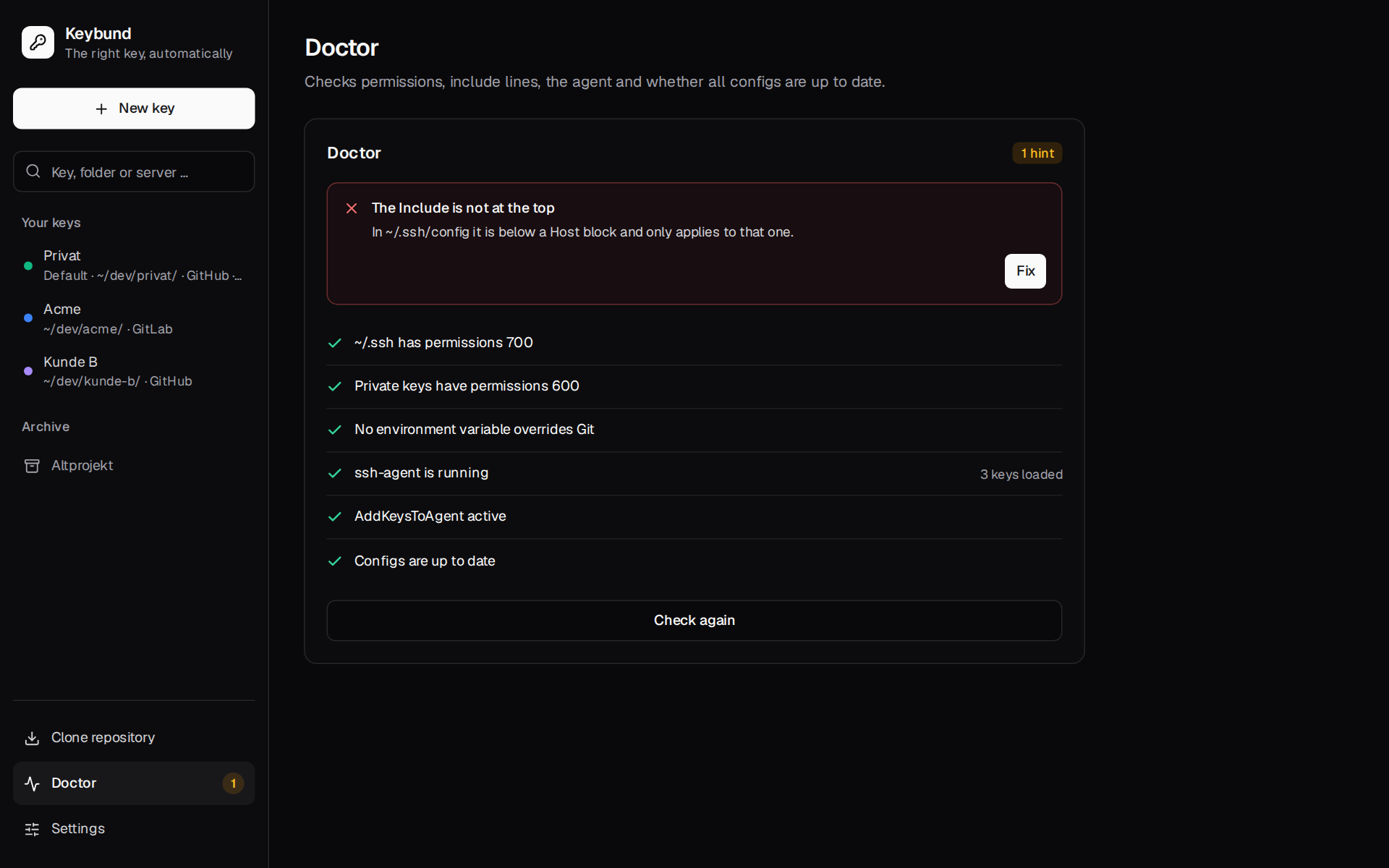
Checks everything Keybund depends on – permissions, the position of the include lines, environment
variables that switch Keybund off, the agent, old entries in ~/.ssh/config, Dolphin – and offers
Fix where a fix is safe. All checks are listed in
Troubleshooting.
Clone repository
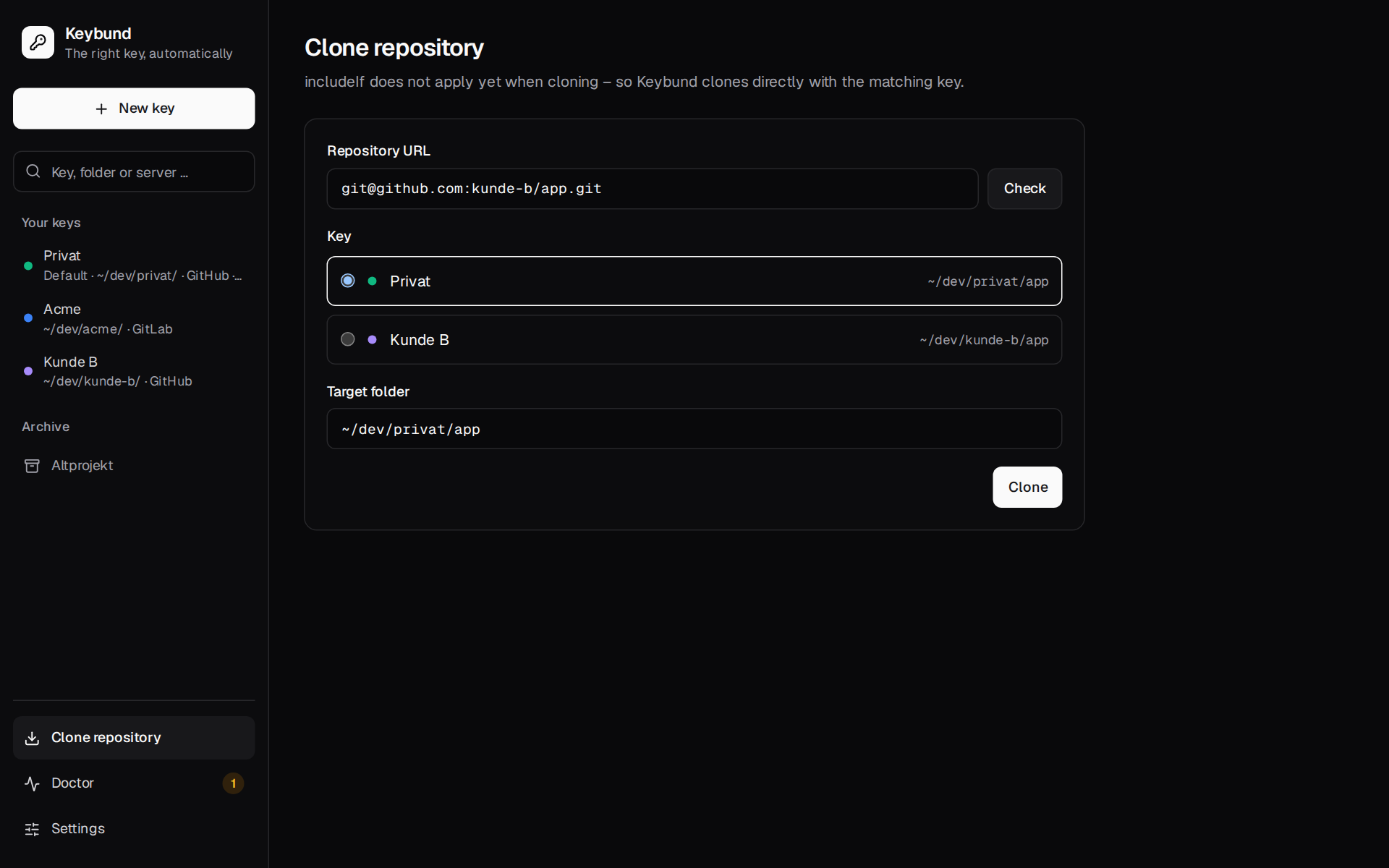
Paste an SSH URL (git@github.com:org/repo.git or ssh://…; an IPv6 address goes in brackets,
ssh://git@[2001:db8::1]/org/repo.git), click Check, pick the key if
several fit and adjust the target folder. Keybund clones with that key directly, because includeIf
cannot apply before the repository exists.
Take over existing SSH config
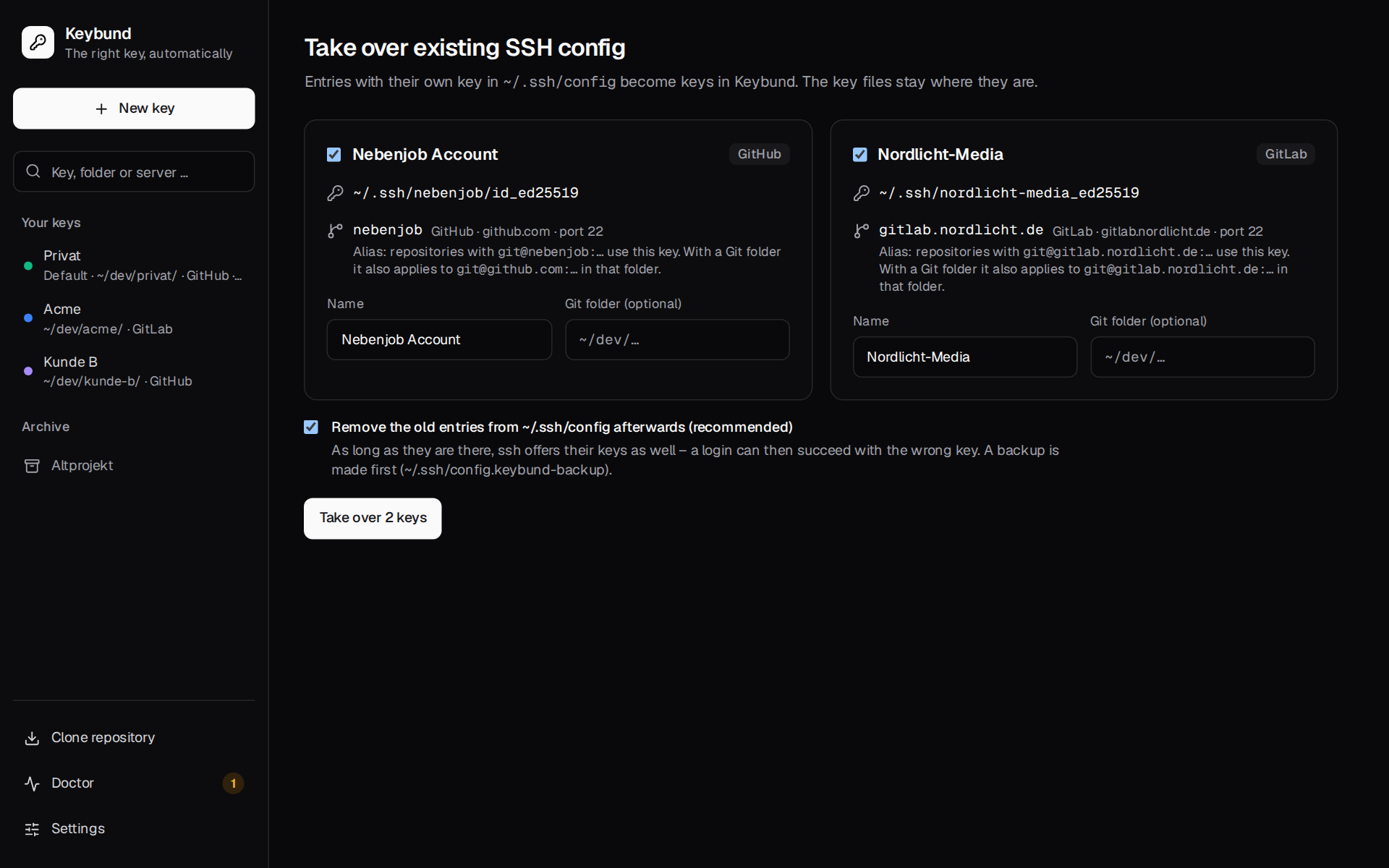
One card per key found in ~/.ssh/config with a name and an optional Git folder, and the recommended
option to remove the old entries afterwards (with a backup). Details in
First steps.
Settings
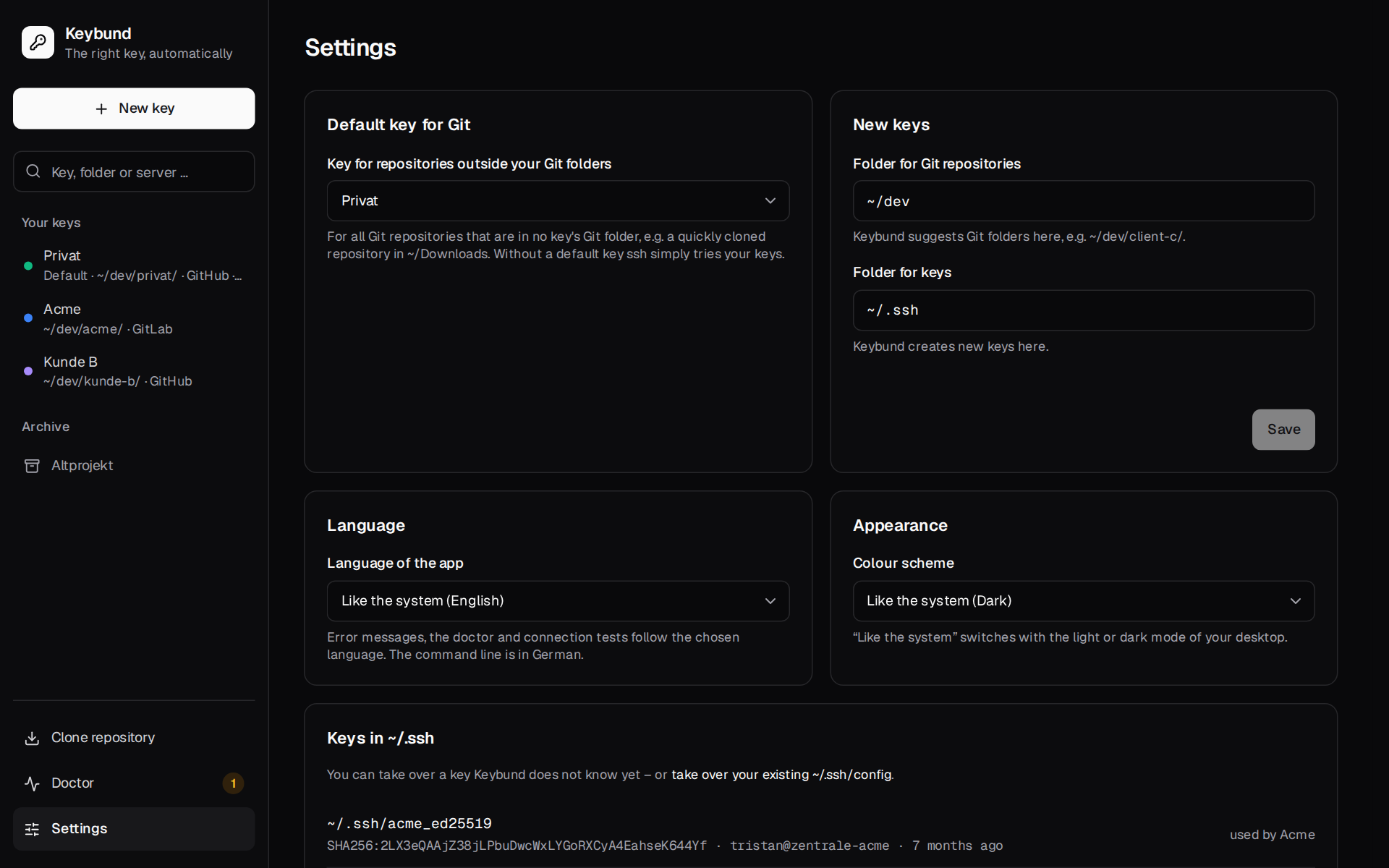
- Default key for Git – the default key, or None – ssh chooses itself.
- New keys – Folder for Git repositories (where Git folders are suggested,
~/dev) and Folder for keys (where new keys are created,~/.ssh). - Language – like the system, English or Deutsch.
- Appearance – the colour scheme: like the system (follows the light or dark mode of your desktop, also while the app is open), Light or Dark.
- Keys in ~/.ssh – every key pair in
~/.sshwith fingerprint, comment and age; keys Keybund does not know yet can be taken over with Take over as key. - Advanced:
- Server fingerprints per key (known_hosts) – keep the host keys of each key's servers in
~/.ssh/known_hosts.d/<key>(on by default); - Include with the full path – write the include in
~/.ssh/configwith the full path instead of~, for Dolphin with an old libssh; - Paths – where Keybund keeps its files;
- Remove Keybund – takes back everything Keybund wrote, with a preview.
- Server fingerprints per key (known_hosts) – keep the host keys of each key's servers in
- About Keybund – version, license and source code.
Without the desktop: the browser preview
The same interface runs in a browser against an in-memory demo backend (just dev-mock), which is
what the screenshots and the end-to-end tests use. Nothing on your computer is touched there. See
Development.