Workbench
The workbench (/rename) is where you rename by hand: pick a folder on the server, check the
preview, fix what is wrong, run it, and undo it if you change your mind.
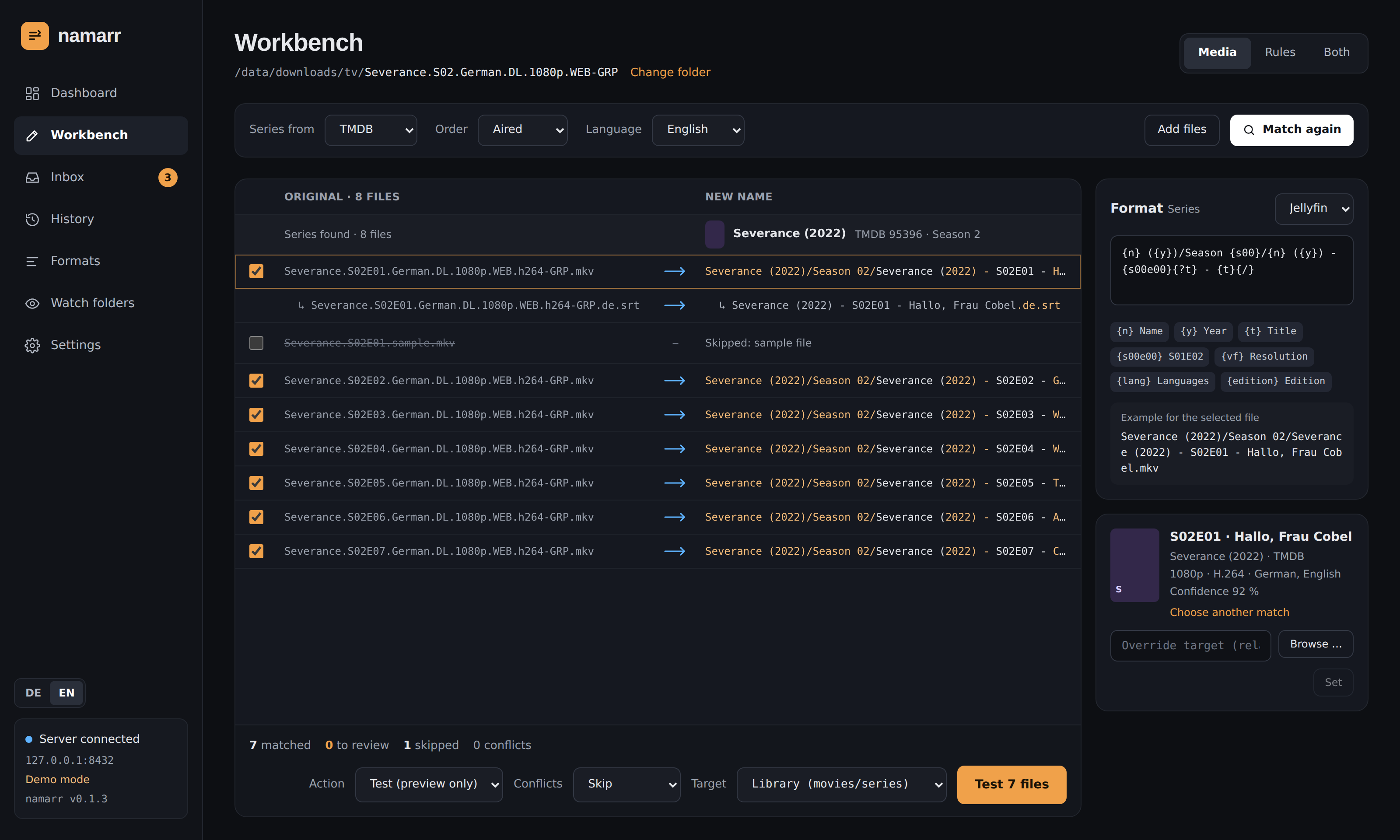
The preview
- Pick a folder on the server (one of the folders in the settings) and a mode:
- Media: match against a metadata source and name by template
- Rules: rename with a rule stack, no database involved
- Both: match first, then polish the result with rules
- The virtualized preview shows old → new with diff highlighting, series groups, companion files
(
↳ .de.srt), confidence badges and skipped samples.
Keyboard: ↑ ↓ select, space includes or excludes a file, Enter opens the match picker to choose another series or movie. A choice can be remembered, so the same release name always lands on the same entry.
On the right:
- the template editor with token auto-completion (type
{) and a live example for the selected file. Above it, pick one of the formats; an edited template can be saved as a new one - the rule stack with drag and drop and a preview per rule
At the bottom: action, conflict policy, target and the button that runs the job. The target is Library by default in media mode: movies go to the default movie library, series to the default series library. It can be switched to rename in place or to one folder for every file. A matched file without a library for its kind stays in its folder, and the preview says so. The target of a single file can be set in the side panel, typed or picked with Browse ….
Actions
| Action | What happens |
|---|---|
| Test (preview only) | nothing; conflicts are marked. New jobs start here. |
| Move | moves the file (across file systems: copy, check size, delete) |
| Copy | copies and checks the size |
| Rename | renames in place |
Hardlinks and symlinks are gone; operations of earlier versions that used them can still be undone.
Every operation lands in the history and can be undone per file, per job or back to a point in time, but only while the target file is unchanged since. Folders that namarr created are removed again when they are empty.
Conflicts
When the target already exists:
| Policy | Behaviour |
|---|---|
| Skip | leaves both files alone (default) |
| Overwrite | moves the existing file aside as a backup, restored on undo |
| Suffix | Name (1).mkv, Name (2).mkv, … |
| Keep better | replaces the existing file only when the new one is better |
Keep better compares one criterion after another, and the first one where the two files differ decides:
- resolution
- source: Remux > BluRay > WEB-DL > WEBRip > HDTV > DVD
- HDR: DV / HDR10+ > HDR10 / HLG > SDR
- video codec: AV1 > H.265 > H.264
- audio: codec, then channels
- PROPER / REPACK
- only then file size
So a 4K HEVC beats a bigger 1080p H.264. The facts come from the file name and, when installed, from ffprobe (resolution, codec, HDR, best audio track). For the existing file namarr uses the release name it had before namarr renamed it, otherwise it would know nothing about its source. A criterion only one side knows does not count. The reason is shown on the item ("Existing file is better (Source: WEB vs BluRay)"); a replaced file is kept as a backup and restored on undo, and its subtitles are replaced with it.
Template language
{n} ({y})/Season {s00}/{n} ({y}) - {s00e00}{?t} - {t}{/}
{t|lower}   {n|replace:':':' -'}   {vf|default:'SD'}   {n|ascii}   {e|pad:3}
{?edition} [{edition}]{/}   {!t}Episode {e}{/}   \{edition-{edition}\}  (Plex)
Tokens: n name, y year, s/e, s00, e00, s00e00 (double episodes: S02E04-E05),
sxe, t episode title, absolute (abs: two digits, 07), d date, vf resolution, vc video codec, ac/af audio,
hdr, source, group, lang, edition, part, id, provider, orig, ext, imdb, tmdb,
tvdb (IDs in those databases, from the folder name or the source: [imdbid-{imdb}]), rating
(average rating with one decimal, 7.5).
Filters: lower upper title trim replace default pad truncate ascii space first.
Conditions: {?t}…{/} only when t is set, {!t}…{/} only when it is not.
Every path segment is cleaned for the target system: characters Windows forbids, : → -,
reserved names, 255 bytes per segment, NFC.
Formats
A format is a named template for movies or for series. Under Formats (/formats):
- Built-in formats for Plex, Jellyfin, Emby and Kodi. They cannot be changed; Copy makes an own format from one.
- Own formats: add, edit, copy and delete them, each with a live example.
- One default per kind (Jellyfin unless you choose another). New jobs, watch folders and the download client hook use it unless they pick another format.
Detect from library: pick one file of a library you already have, say
/tvshows/Dark/Staffel 01/Dark - S01E01 - Geheimnisse.mkv. namarr matches it like any other file,
puts the tokens back where the values are ({n}/Staffel {s00}/{n} - {s00e00}{?t} - {t}{/}) and
merges what the files show (a rating only some have becomes a condition, EAC3 a
replace filter for the audio codec) and checks the result against up to a dozen more files of the same library, spread over its series or
movies. It says which built-in formats fit, or offers the detected one as a new format, and lists
every file it does not fit with the name namarr would write instead. A file that differs only in its rating counts as fitting: ratings change over time, and a file
named before its title had one has none. Episode titles are compared in
the language of the settings and in English. Without a metadata source only what the names say
counts (no episode titles).
In the workbench, the select above the template switches the format of the selected file's kind. Editing the template there changes only this job; Save as format keeps it for later. A format a watch folder still uses cannot be deleted.
Profiles of earlier versions were taken over at the first start: their own templates became formats named after the profile, and the watch folders that used a profile got its formats, series source, action and targets. Rule stacks of profiles were not taken over (the log names those profiles): set them up again in the workbench and keep them as YAML.
Rules
In Rules mode namarr renames without any database, like ReNamer; in Both mode the rules polish the names that came from the database. Rules run top to bottom, each one shows its result for the selected file, and each can be switched off on its own. Unless noted, a rule works on the name, the extension or the full path.
| Rule | What it does | Example |
|---|---|---|
| Replace | text or regex with $1 groups, all or the first match, optionally case-sensitive |
IMG_(\d{8}) → $1 |
| Insert | text at the start, the end or a position | Holiday - + name |
| Delete | characters from a position, also counted from the end | drop the first 4 characters |
| Case | title, sentence, lower, UPPER | the office → The Office |
| Normalise separators | spaces, dots, underscores and dashes to one separator | a.b_c → a b c |
| Numbering | start, step, digits, separator, list or natural name order | 01 - IMG_0001.jpg |
| Date from file | modification or creation date, any format | 2024-07-14 IMG.jpg |
| Extension | new extension, lower or upper case | .JPG → .jpg |
| Transliterate | umlauts and accents to ASCII | Größe → Groesse |
| Cut the rest | everything from a pattern on | cut from - |
| Pad numbers | every number to at least N digits | Folge 5 → Folge 05 |
| Clean up | bracketed parts [ ] ( ) { }, dots and underscores to spaces, tidy spaces |
Song [Official Video].mp3 → Song.mp3 |
| Strip characters | digits, symbols or a set of your own | Track #1! → Track 1 |
| Rearrange | split at a delimiter and rebuild with $1, $2 … ($0 = everything) |
Title - Artist → Artist - Title |
| Name list | one new name per line, assigned in list or natural name order; files past the list stay | paste 20 episode titles |
| From the file | values read from inside the file, see below | 2024-07-14 18-03-22.jpg |
From the file: photos, videos, music
The template can use:
| Token | Source |
|---|---|
{date:YYYY-MM-DD HH-mm-ss} |
capture date: EXIF of photos (JPEG and TIFF-based raw files such as DNG, CR2, NEF, ARW), the creation time of videos (ffprobe) |
{artist} {albumartist} {title} {album} {genre} |
audio tags (ffprobe: MP3, FLAC, M4A, Ogg, Opus, …) |
{track} {disc} |
numbers, {track} with 2 digits ({track:3} for 3) |
{year} |
the year of the release date tag |
{any_tag} |
any other tag by its name |
The result can replace the name or go before or after it. Slashes in the template make folders
below the file's folder, so {artist}/{album}/{track} {title} sorts a pile of MP3s into artist and
album folders. A slash inside a tag (AC/DC) does not, and every folder name is cleaned like a file
name. A file that lacks a value the template uses keeps its name, so a scan without EXIF never
becomes a half-empty name.
The values are read only when such a rule is active, and once per file version, so editing the rules stays fast. HEIC photos are not read yet.
Sharing rule sets
Export below the rule stack saves the rules as namarr-rules.yaml; Import loads such a file (or
JSON) and replaces the current rules. That is how rule sets move between jobs, installations or
people.